How to Automate Manufacturing Processes Easily
Picture walking onto a factory floor where machines handle the dull, dirty, risky, and hard tasks. Your people focus on growth instead. That's the real promise of manufacturing process automation. Yet for most makers, the path from manual chaos to smooth automation feels huge. Where do you start? What does it look like to automate manufacturing processes in your plant?
Manufacturing process automation is more than adding robots or belts. It's the art of making your systems work together with less friction and fewer errors. Think of it like teaching your factory to "think" for itself. Repetitive jobs get handled on autopilot. Data flows between systems without copy-paste mistakes. You see problems before they turn into disasters.
Why does this matter now? An IDC study of Dynamics 365 manufacturers found (opens in new tab) a 27% increase in process automation. Those adopting it cut errors, boost safety, and build scalable growth don't get left behind. Automation isn't just about speed. It's about cutting errors, boosting safety, and building a base for growth.
Every automation story starts with the 4 D's. Dull tasks no one wants to do. Dirty jobs that drain morale. Dangerous steps that put people at risk. Difficult chores that steal time from real work. You'll learn how to spot these pain points in your process and how to fix them.

In this guide, you'll get clear steps on how to automate manufacturing processes in your facility. We'll break down four practical stages. Identify tasks. Select tools. Integrate systems. Scale up for impact. Along the way, you'll find tactics used by top makers and a few warning tales. Expect real examples, clear steps, and the tools you need to make progress. No jargon walls or empty promises.
Ready to turn repetitive work into real results? Let's start your automation journey now.
Prerequisites for Success
Tools and Resources You'll Need
To automate your manufacturing processes well, start by picking the right tools. You'll need PLCs (programmable logic controllers), industrial PCs, sensors, actuators, and solid networking gear.
On the software side, look for platforms that support Python, Ladder Logic, or Structured Text. These are staples in automation projects. Think of them as the "universal translators" between your machines and your business logic. Modern automation also uses vendor systems like Siemens TIA Portal or Rockwell Studio 5000.
A Plex Systems report (opens in new tab) shows how manufacturing automation enhances production monitoring KPIs through connected data and analytics.
Quick check: Before moving forward, confirm you have all required hardware parts and at least one supported programming platform.
Knowledge and Team Setup
Before starting any project, build a team with mixed skills. You'll need:
- A project manager who gets both business goals and technical steps.
- Engineers who know PLC programming basics and automation vendor systems.
- IT experts who can link old equipment and new platforms.
For example, when our team connected five different sales platforms into one dashboard for a retailer, every role mattered, from coding microservices to mapping workflows on whiteboards.
You'll learn about the five core parts of automation. Sensors give input. Controllers act as the brain. Actuators provide muscle. Communication networks work like nerves. User interfaces serve as eyes and ears. It's like building a robot that senses its world and then acts on what it learns.
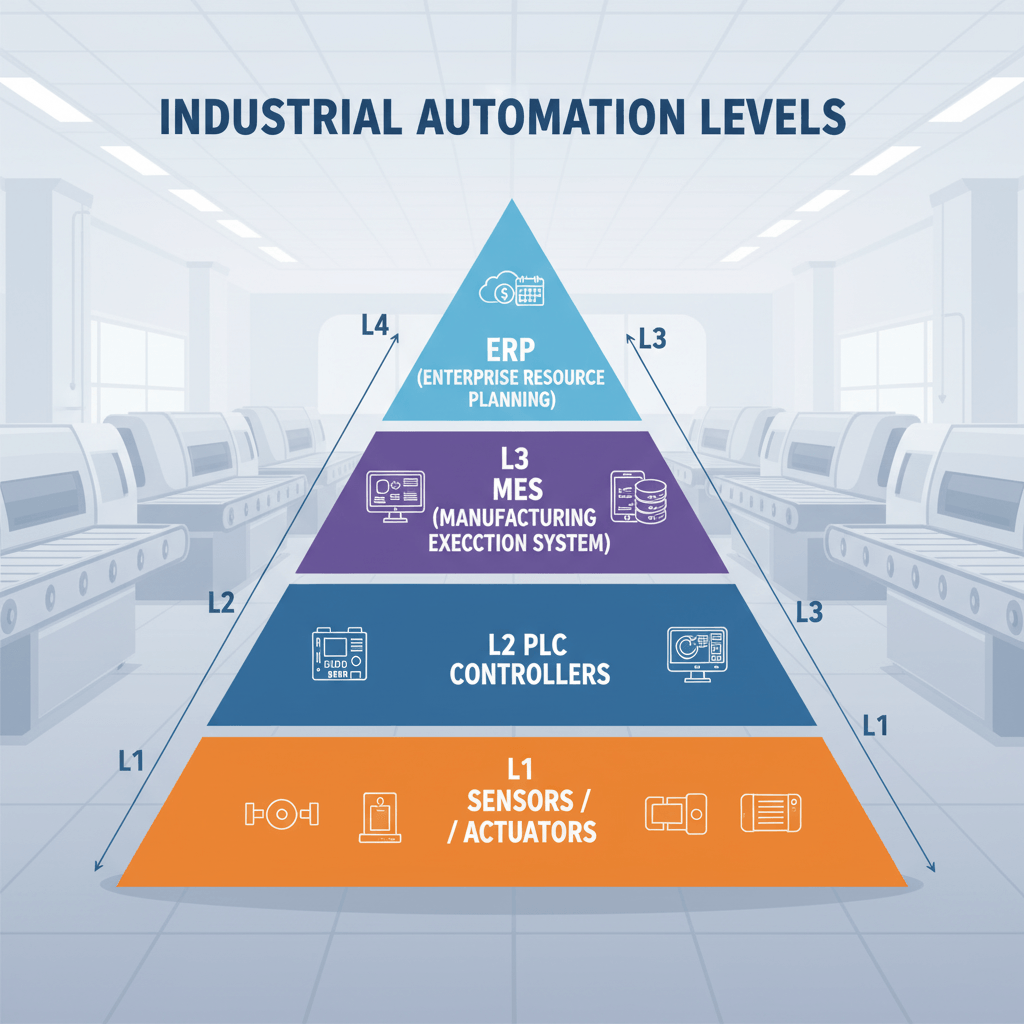
Quick check: Your team should read wiring diagrams and basic code easily before starting. At this point, you're ready to plan how to automate manufacturing processes with confidence. More tips at Unleashed Software's guide to manufacturing process automation (opens in new tab).
Step-by-Step: How to Automate Manufacturing Processes
Step 1: Assess Current State and Find Opportunities
Start by mapping your entire process step by step. Walk the production floor with a notepad or digital tool. Watch how each product moves from raw material to finished result. Talk to operators. Ask where things slow down, break, or get repeated.
In our project for a mid-sized electronics maker, manual inspection was the jam. Each board waited while someone checked every solder joint under a magnifier. It took hours per batch.
Follow this checklist:
- List every task done on your line.
- Mark tasks that are repetitive or error-prone.
- Record time spent on each task for one full day.
- Find pain points - delays, frequent errors, safety risks.
You should now have a clear list of "automation targets." At this point, your team can see which steps eat up time or cause quality issues.
Quick check: Confirm you've logged all major workflow steps and found at least three automation targets before moving on.
Step 2: Design the Automation Plan
Gather your technical leads and process owners for a planning session. Pick automation types that fit each need. Fixed systems use robotic arms. Programmable systems use CNC machines. Flexible systems use AI-driven vision. According to Plataine's (opens in new tab) 2025 AI updates, PLCs and robotics drive efficiency in modern factories.
In our own warehouse project, we spotted three quick wins:
- Automated barcode scanning at inbound stations
- Conveyor belt routing changes using sensors
- Real-time dashboards pulling data from all lines
Build a roadmap:
- Rank high-impact automations first.
- Define ROI metrics - cycle time cuts, defect rate drops, labor hours saved.
- Select vendors or tools. PLC software, such as Siemens TIA Portal or open-source options, as needed.
- Assign roles for setup and integration.
You should now have a written plan showing what gets automated when and who is responsible for delivery.
Quick check: Confirm your plan includes timelines and clear goals. For example, "Cut manual inspection by 75% within six weeks."
Step 3: Put Automation Solutions in Place
Begin with small pilots before scaling up. This is a lesson we learned from automating invoice processing for our clients' manufacturing arm.
Here's how we did it:
- Set up PLCs using vendor docs like "TIA Portal Getting Started."
- Deploy machine vision cameras. Connect them to your network using standard protocols like OPC UA.
- Set up monitoring dashboards with Grafana to track real-time metrics from new devices.
- Train staff on new interfaces with short workshops and printed cheat sheets.
Use sample code as needed:
// Example: Siemens S7 PLC Motor Start Logic
IF Start_Button = TRUE THEN
 Motor := TRUE;
ELSE
 Motor := FALSE;
END_IF;
Step 4: Test and Check Results
Testing isn't one-and-done. It's ongoing observation backed by complex numbers.
To measure success after each stage:
- Track KPIs set during planning. Compare cycle times before versus after.
- Run parallel production for one week. Manual versus automated. Then compare outputs.
- Interview staff. Are there fewer jams? Less rework?
Data from Deloitte's 2025 survey (opens in new tab) shows that manufacturers achieve 10-20% output gains shortly after implementing automation tools, such as sensors and AI vision.
After we automated label printing at an FMCG client's facility, throughput jumped by 40%. Operators shifted focus from label wrangling to quality control instead. A win-win outcome visible in every shift report.
You should now have both hard proof - higher output - and soft feedback. "It just works better!"
Quick check: Before sign-off, confirm that every key metric meets targets set in step two. Document lessons learned for future rollouts.
You've just followed a practical guide to manufacturing change. From discovery through design to live results. With real-world examples drawn straight from the Mygom.tech (opens in new tab) playbook on how to automate manufacturing processes successfully. Each phase builds confidence. And ensures you're not just installing tech but solving real problems where they hurt most.
Common Problems and How to Fix Them
Mistakes to Avoid
When you start learning how to automate manufacturing processes, small mistakes can spiral fast. Many teams skip step one: assess current workflows with real data. For example, a client once gave us process charts that looked perfect on paper. But when we watched the floor, operators used three unofficial workarounds per hour. If you automate a broken process, you just get faster chaos.
Here are common errors to dodge:
- Ignoring L1-L4 layers. In automation, L1 (Sensors/Actuators), L2 (PLC/Controllers), L3 (MES), and L4 (ERP/Business Planning) each play distinct roles. Skipping links between these levels creates data silos.
- Making PLC logic too complex early on. Start simple. One input, one output. Build complexity in stages.
- Forgetting check steps after each build phase. This matters especially if you're juggling multiple vendor tools.
It's like building a Lego city without instructions. Easy to miss the crucial base piece that holds everything together.
How to Fix Common Issues
Even with careful planning, roadblocks happen. Broken links, mysterious sensor errors, or flaky PLC programs.
Follow these troubleshooting tactics:
First, trace signals from bottom up. Check your sensors (L1). Are they sending the correct values? Next, test your PLC code (L2). Use debugging features in your programming tool. Most support live monitoring.
Example: We once found an entire production line offline because two sensors had identical IDs in the system.
Second, map process flows visually before writing code for your MES (L3) or ERP connections (L4). This helps spot missing links or mismatched data types.
Third, always verify at each stage:
- At L1/L2: Run manual overrides. Does the actuator move as expected?
- At L3: Does order tracking update correctly when simulated?
- At L4: Check reports for accurate totals after test runs.
If you see odd outputs or stuck signals, check for version mismatches between software tools. This is a common cause of silent failures.
Data from Plataine (opens in new tab) shows companies cut downtime by up to 30% when they invest in solid troubleshooting and clear documentation at every level.
You're not aiming for perfection on day one. You want steady progress and confidence that each part works as intended before moving forward.
Quick answers:
- L1: Sensors and actuators
- L2: Controllers like PLCs
- L3: Manufacturing execution systems
- L4: Business planning/ERP
- Process automation in PLC: Using programmable controllers to run machines on autopilot
- How do you automate manufacturing? Assess current state first. Then connect all four levels step by step.
Turning Small Wins into Lasting Change
You've learned how to spot the best opportunities for automation. You've learned how to build a strong team. You've learned how to avoid the usual traps. The most successful makers know one truth: progress is only real if you can measure it. Set clear KPIs. Think cycle time, error rates, machine uptime. These numbers tell your story better than any presentation ever could.
As you expand automation across your factory floor, don't chase perfection on day one. Start small with one line or process. Track results every week. When you see improvement - fewer jams, happier staff - that's your signal to scale up. Continuous improvement isn't just a buzzword. It's how legends in manufacturing are made.
If you're ready for that next chapter, map out three steps:
- Pick a process where change will hit hardest.
- Define what "better" looks like in real numbers.
- Bring in guides who have walked this path before.
That's where we come in. Mygom.tech team helps you turn messy reality into measurable gains. Fast and with honest feedback at every twist and turn.
Change is never easy in manufacturing. But stories of growth always start with action. Your story? It begins now.
We can help. Reach out (opens in new tab).
Gabriele J.
Marketing Specialist