How to Use AI in Marketing Effectively
Picture your competitors moving twice as fast. They reach customers you haven't even seen. That's not a fairy tale, it's the new reality in marketing. Data (opens in new tab) from IBM shows that around 72% of global businesses now use AI technologies, including in marketing, to improve efficiency and results.
Here's where most teams hit a wall. They choose tools blindly. They build campaigns without direction. They feed messy data into smart systems that can only output junk. This guide is different. You'll learn what to prepare before you launch a single AI campaign. We'll walk through the tools you need. You'll see real examples. You'll make sure your data tells an honest story.
By the end, you won't just watch others win with AI. You'll know exactly how to start your own journey and avoid the common pitfalls along the way. Ready? Let's turn complexity into your next edge.
Prerequisites
Before you start using AI in your marketing, you need a few things in place. Think of these as the tools in your backpack before a long hike.
Clear business goals: Write down what you want to achieve. Be specific. "Increase sales" is vague. "Boost email open rates by 15% in three months" is clear.
Access to customer data: You need data to feed your AI tools. This includes email lists, website analytics, CRM records, and purchase history. If your data is scattered across multiple spreadsheets, gather it first.
Marketing technology stack: Make sure you have basic platforms running. You'll need an email tool, a CRM, and web analytics. Most AI tools connect to these systems.
Team buy-in: Talk to your team before you start. Explain what AI will do and what it won't. Get everyone aligned on the plan.
Budget allocation: AI tools cost money. Some offer free trials, but most require a subscription. Set aside a budget for at least three months of testing.
Data privacy compliance: Check that your data handling follows GDPR, CCPA, or other rules in your market. AI can't fix privacy violations.
Technical access: You'll need admin rights to install integrations. Make sure you can access API keys, connect third-party apps, and edit platform settings.
At this point, you should have everything ready to move forward. If you're missing any of these, pause and fix that gap first.
How to Use AI in Marketing: Step-by-Step Guide
Step 1: Define Goals and Success Metrics
Start by setting clear goals. What do you want to achieve with AI? Write it down. Use specific numbers and timelines. For example: "Increase email open rates by 15% this quarter" or "Cut cost-per-lead by half in six months."
Next, define what success looks like. Pick metrics you can track. These might include conversion rate, engagement on content, or time saved on tasks. Use a simple spreadsheet to track these KPIs on a weekly basis.
Make sure each goal has a number attached. Vague goals like "improve marketing" won't work. You need clear targets like "grow newsletter signups by 20% in six months."
You should now have a list of goals and key results. Check that each KPI can be measured with tools you already use.
Checkpoint: Confirm every goal has a metric assigned. If you can't measure it, you can't improve it.
Step 2: Pick the Right AI Marketing Tools
Think about where AI will help most. If you need to create content quickly or want better audience segments, focus on those areas. These are good places to start using AI tools.
Research top tools for your needs. For text generation and chatbots, many marketers use ChatGPT or Jasper. For automated ad buying, look at Albert or AdCreative.ai. For analytics, try HubSpot's AI features or Google Analytics 4 for comprehensive campaign tracking.
Here's an example: If you want to personalize emails at scale, pair Mailchimp's AI features with Jasper's copy generator. These tools can match the quality of human-written copy in A/B tests.
For technical teams using Payload CMS, we wrote a complete guide (opens in new tab) on automating content workflows. It covers setup, templates, AI generation, review, scheduling, and backlog tracking, all within your current CMS.
For SEO auditing, tools like Ahrefs, Semrush, or MygomSEO (opens in new tab) help identify technical issues before campaigns launch.
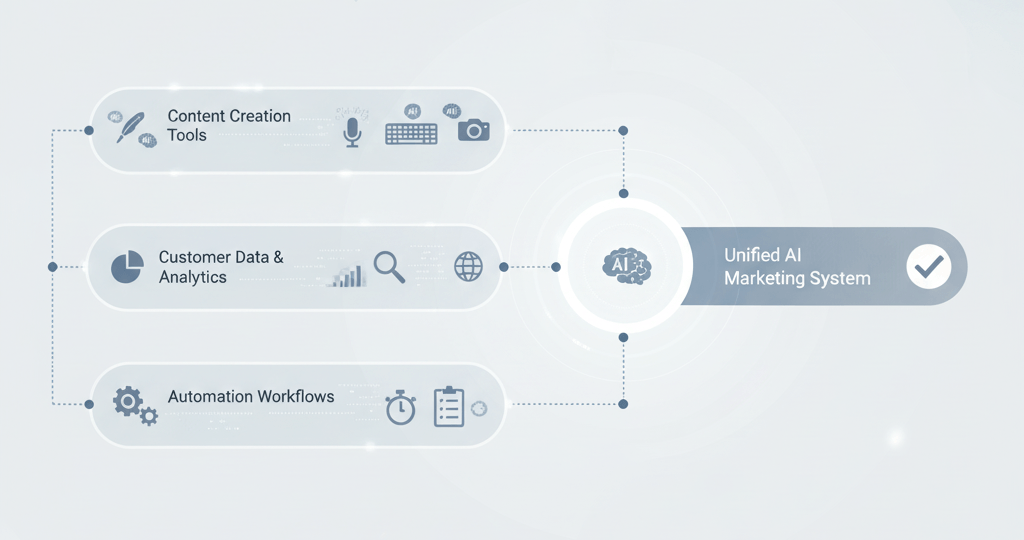
Shortlist three tools per task type. Focus on content creation, analytics, and automation. Use free trials when possible. This lets your team test real-world fit and output quality.
Checkpoint: Make sure each tool integrates with your existing platforms. Check CRM and CMS compatibility before you commit long-term.
Example from the field: A B2B software company was burning 15 hours per week writing personalized outreach emails to cold leads. Their sales team customized every message by researching each prospect's company, role, and pain points.
They started using ChatGPT with a prompt template that pulled data from their CRM. The AI-generated first drafts took 30 seconds instead of 20 minutes. The team still reviewed and personalized each email, but their weekly email production jumped from 45 to 180 messages. Response rates stayed constant at 12%, meaning they tripled pipeline opportunities without adding headcount.
The takeaway is that AI doesn’t need to be perfect. It should handle routine tasks, so your team can focus on more important strategies.
Step 3: Connect AI to Your Workflows
Connect your AI tools to daily processes step by step. Don't add everything at once. Start small. Add an AI chatbot to handle basic website questions. Or plug an image generator into your social media workflow.
For example, you can connect ChatGPT to Zapier to automatically create draft responses. Set customer inquiries from HubSpot forms as the trigger. This saves your team time and keeps replies consistent and quick, which is how top brands improve customer experience. IBM (opens in new tab) notes that adding AI to marketing workflows helps teams act faster on data and automate many tasks that were once manual.
Create a checklist for each integration:
- Identify API keys needed
- Set up user permissions
- Test connection using sample data
- Monitor first-week outputs closely
- Document any errors or failures
- Adjust settings based on initial results
You should now see new automation options inside your existing dashboards. Look for custom fields or widgets labeled "AI-generated."
Checkpoint: Verify that data flows correctly between systems. Run a real campaign start-to-finish using your new setup.
Step 4: Review Insights and Act Fast
Review insights from your AI tools after launch. Look beyond surface stats. Focus on trends and anomalies flagged by the system.
Here's an example: Your image generator suggests that certain visuals drive higher clicks during lunch hours, but not in the evenings. Adjust future scheduling based on this. Shift budget toward peak performance windows.
Inspired by guidance from Concord USA (opens in new tab) on intentional, data-driven AI adoption, the most effective teams treat AI as an ongoing practice: they review performance dashboards regularly, act quickly on insights, and continually iterate on underperforming campaigns, rather than viewing AI as a one-time setup.
Sample Analytics Review Workflow
Every week, export reports from each tool, hold a 30-minute meeting to review wins and losses, document which actions improved results, adjust campaigns directly in your platforms, and share the key learnings with the wider team.
You should now see steady gains in efficiency. You'll have more time freed up for creative work instead of routine analysis.
Checkpoint: Confirm that changes based on AI insights deliver measurable improvements. Compare against the goals you set in Step 1 before scaling further.
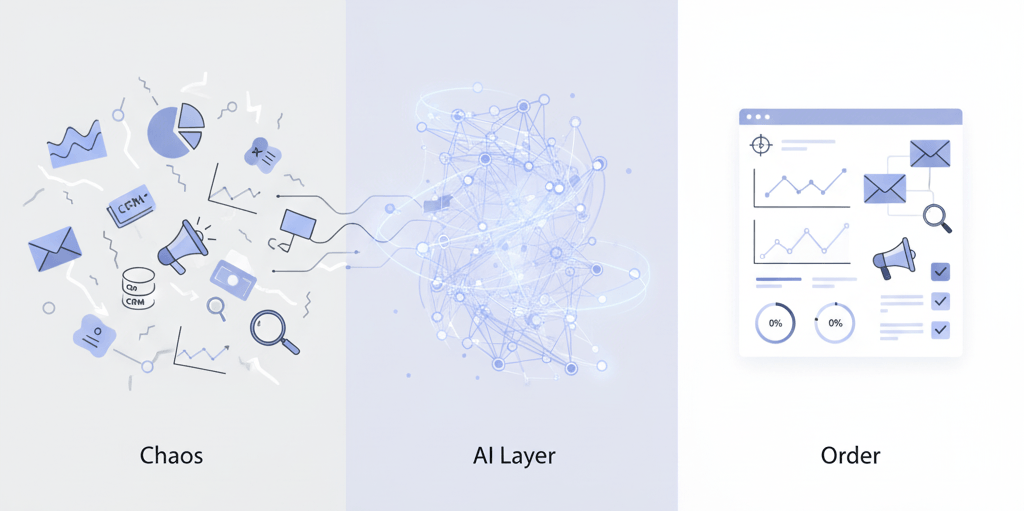
People use AI in marketing to automate tasks. They create personalized experiences at scale. They analyze massive datasets instantly. They get insights they'd never spot manually. ChatGPT helps write emails. It answers FAQs automatically. It brainstorms ad copy ideas. It even analyzes sentiment in reviews if plugged into feedback channels.
If you're asking how to use AI in marketing, start with small tests. Tie them tightly to business outcomes, not technology hype. Let results drive wider rollout across campaigns.
Best AI Marketing Tools to Use Throughout 2026
AI marketing tools change quickly. What works now may not work in the future, but some tools remain reliable. Here’s a practical guide to the best AI marketing tools for 2026, organized by your specific needs.
The tools listed below represent the current state of the AI marketing landscape. We've evaluated them based on pricing transparency, integration capabilities, user reviews, and the types of problems they solve. Some we use internally. Others we recommend based on client needs and industry feedback. Your best choice depends on your team size, budget, tech stack, and specific marketing challenges.
Top AI Content Creation Tools
Start by picking a content AI platform that fits your workflow. Jasper and Copy.ai are now staples for content teams. They create on-brand blog posts, emails, and ad copy at scale. Writer is another strong choice if you need strict brand voice control.
Here's how to use these tools:
- Sign up for Jasper, Copy.ai, or Writer
- Upload your brand guidelines and voice samples
- Enter a prompt like "Write LinkedIn post about new product launch"
- Review the draft and edit as needed
- Export to your CMS or social media scheduler
You should now see content tailored to your needs in seconds.
Checkpoint: Verify that the output aligns with your tone before publishing.
If you get generic results, adjust the input prompt. Upload more reference material. According to IBM (opens in new tab), generative AI needs clear direction from you to deliver high-performing marketing assets.
For images or video, try Midjourney or Synthesia. These create visuals that fit your campaign theme without expensive photo shoots.
Customer Data and Analytics Platforms
Next, use analytics platforms to learn from customer behavior. Segment is a top choice because it connects all your touchpoints - web, app, and email - so you can track every user interaction in one dashboard.
Other strong options include Salesforce Einstein for CRM-integrated insights and Google Analytics 4 for web behavior tracking.
Here's how to set up Segment:
- Connect Segment to your website using their SDK
- Map customer events like sign-ups or purchases
- Sync data with analytics tools such as Amplitude or Google Analytics 4
- Analyze which channels drive conversion
- Build audience segments based on real behavior
You should see unified reports showing customer journeys across platforms. A single source of truth for decisions.
Checkpoint: Ensure data from all sources flows into Segment without errors before launching new campaigns.
A Concord USA (opens in new tab) analysis suggests that companies using customer data platforms are more likely to see year‑over‑year improvements in retention.
Marketing Automation and Personalization Tools
Finally, automate campaigns and personalize experiences with tools like HubSpot Marketing Hub or Salesforce Einstein. These platforms handle everything from email sequences to ad targeting and real‑time personalization. ActiveCampaign and Marketo are also strong options, offering advanced automation with intuitive workflow builders.
Here's how to set up automation:
- Create audience segments based on real-time behavior (like abandoned cart shoppers)
- Build automated workflows that trigger personalized emails when users complete key actions
- Test different messages using built-in A/B testing features
- Monitor performance dashboards daily
- Refine triggers based on what converts best
By now, your campaigns should mostly run automatically, sending each customer the right offers at the right time.
If an automation fails, such as emails not sending, check the triggers and workflow logic first before looking for other issues.
Emerging AI Tools Gaining Traction in 2026
Several platforms are gaining momentum throughout 2026:
Jasper for Teams: Now includes brand voice training and team collaboration features. Best for content teams producing 20+ pieces per month who need a consistent tone across multiple writers.
Drift and Intercom: AI chatbots that handle customer service and lead qualification. Perfect for B2B companies with high website traffic who can't respond to inquiries fast enough.
Canva AI: Design tools with AI-powered layout suggestions. Ideal for small marketing teams without dedicated designers who need social graphics, presentations, and ad creative on tight deadlines.
Surfer SEO: Content optimization that analyzes top-ranking pages. Use this if your blog posts aren't ranking despite solid writing - it tells you exactly what search engines want to see.
Seventh Sense: Email send-time optimization. Worth testing if you have email lists above 5,000 subscribers where send-time personalization can move the needle on open rates.
When you use content AI tools along with strong analytics and automation platforms, you can achieve new growth. This approach helps you turn large amounts of data into real results without overworking your team.
Success Criteria and Verification Steps
Setting Clear Outcomes
Start by defining clear KPIs before you launch any AI-powered marketing initiative. Choose metrics tied to your specific goals. Think conversion rate, cost per acquisition, or customer lifetime value.
For example, if your aim is to increase email engagement, set a KPI like "boost click-through rates by 20% in three months." Write it down. Make it visible to your team.
Apply the 30% rule in AI as a checkpoint. If an AI-driven strategy can improve a process by at least 30%, it's worth scaling up. This approach keeps your efforts focused on high-impact changes.
For broader adoption, use the 10-20-70 rule for AI. Dedicate 10% of resources to new ideas. Spend 20% optimizing pilot projects. Commit 70% to scaling proven strategies. This framework ensures you balance innovation with practical implementation.
You should now have a measurable benchmark for success.
Checkpoint: Confirm every campaign has at least one quantifiable target before moving forward.
Ongoing Performance Monitoring
Configure real-time dashboards using platforms like Google Analytics or advanced AI analytics tools. Track behavior and engagement patterns as campaigns run.
Monitor results weekly. Compare them against established KPIs. If you see lagging performance, analyze insights from the AI system. Often, it will reveal hidden trends or bottlenecks.
Refine your strategies based on these findings. Adjust budgets, creative assets, or channels as needed. This iterative loop is key in how to use AI in marketing for continuous improvement.
Set up automated alerts for major changes. If conversion rate drops 15% overnight, you want to know immediately, not three weeks later in a monthly report.
Checkpoint: Ensure trend lines for each KPI are visible and updated regularly on your dashboard.
Real-World Case Example
Here's a real story. A mid-sized retailer struggled with stagnant online sales despite regular promotions. They set a measurable goal: increase average order value by $15 within six months using predictive product recommendations powered by AI.
Inspired by Concord USA's guidance on data-driven AI adoption (opens in new tab), they integrated an advanced recommendation engine and tracked purchase behavior on a weekly basis.
Insights from the tool revealed customers often bought accessories when prompted post-checkout. This was something their team hadn't noticed before.
Within four months, average order value rose by $19. A direct result of refining strategies based on real-time data and acting quickly when new opportunities emerged.
At this point, you should see clear evidence that well-defined outcomes and ongoing monitoring drive transformation through smart use of AI in marketing.
Frequently Asked Questions About AI in Marketing
What AI tools should I start with as a marketer?
Start with what hurts most. If your team spends hours writing email copy, begin with ChatGPT or Jasper. If you're drowning in spreadsheet data you can't make sense of, start with Google Analytics 4 or HubSpot's AI features. Don't try to do everything at once. Pick one pain point. Fix it. Then move to the next.
How much should I budget for AI marketing tools?
Plan for $200-500 per month if you're a small team testing basic tools. Mid-sized marketing departments typically invest $1,000 to $ 3,000 monthly once they scale across multiple channels. Remember: the tool subscription is just part of the cost. Factor in time for setup, training your team, and refining workflows. Budget at least three months before judging the results.
Do I need technical skills to use AI marketing tools?
No. Modern AI marketing platforms are built for marketers, not developers. If you can use HubSpot or Mailchimp, you can use AI tools. Most offer templates, drag-and-drop builders, and guided setups. You'll need admin access to your existing marketing stack, but you won't write code.
How long before I see results from AI?
Expect efficiency gains within weeks, including faster content creation, better-organized data, and automated routine tasks. Revenue impact takes longer. Most teams see measurable improvements in conversion rates or cost-per-lead after 2-3 months of consistent use and optimization. This isn't magic. It's compound progress.
Will AI replace my marketing team?
Not even close. AI handles repetitive tasks, such as drafting email copy, analyzing performance data, and scheduling posts. It can't develop a brand strategy. It can't build relationships with customers or partners. It can't make judgment calls when a campaign goes sideways. Think of AI as your team's productivity multiplier, not their replacement.
What's the biggest mistake marketers make with AI?
Jumping in without clear goals. Teams buy tools because competitors are using them, then wonder why nothing improves. Start with a specific problem: "Our email open rates are stuck at 18% and we need them above 25%." Then find the AI tool that solves that problem. Technology without a strategy just wastes budget faster.
Conclusion
You’ve reached the end of this AI marketing guide for now. You've learned how to spot data issues and set goals grounded in reality. You've learned to choose the right tools and integrate them without disrupting your workflows. Each step has helped your organization move forward, creating a place where data supports your goals.
The real power isn't in the tools themselves. It's in how you use them to tell your brand's story. When your team aligns strategy with outcomes and builds on clean data, AI becomes more than technology. It turns into a trusted guide through every campaign twist and market turn.
Your next move? Put these lessons into action. Audit your data sources. Recalibrate objectives as needed. Keep ethics at the heart of every workflow. Minor improvements compound over time. Sometimes, just 2% can transform an entire outcome.
The future will favor those who use technology with a clear purpose. Use what you’ve learned here as a foundation for campaigns that connect with people. This is just the beginning. Let’s see what you achieve next.
Turn AI Marketing Ideas Into Working Systems
Most marketing teams know what they want AI to do. They've seen the demos. They've read the case studies. But when they try to implement it? The tools don't fit their workflows. The integrations break. The data doesn't cooperate.
That's where we come in.
We're a custom software development company that builds AI-powered systems for businesses that need more than off-the-shelf solutions. We've developed AI content automation plugins, SEO auditing tools, and custom quoting systems that handle complex workflows most platforms can't touch.
We've built AI systems for content teams, SEO workflows, and complex B2B processes. Let's discuss what you're trying to accomplish and determine whether custom development is a suitable solution for your situation.
Book a consultation (opens in new tab) to discuss your goals and determine if custom development is the right path forward.
Gabriele J.
Marketing Specialist