Custom EdTech That Actually Gets Used

Your school just spent months implementing new software. Teachers completed the training. Admins updated the workflows. Then three months later, half the staff is back on spreadsheets.
Sound familiar? You're not alone. According to a UNESCO Technology in Education report (opens in new tab), 67% of education software licenses in the United States go unused. 85% of the pedagogical tools evaluated were found to be either a poor fit or implemented incorrectly. The money gets spent. The problem stays.
The issue isn't technology. It's the approach. Most schools buy software before they understand the problem. They adopt tools that look great in demos but don't match how their teams actually work. And when adoption fails, the instinct is to try the next tool — not to fix the process.
This guide shows you how to do it differently. We took a broken, disconnected platform and rebuilt it as a single connected system for a client operating across multiple countries. We've seen what works and what kills these projects.
Let's get into it.
Three Things to Sort Out
Before you evaluate a single tool, get these three things clear.
Map where time and trust actually disappear. Talk to teachers, administrators, and parents. Don't ask what features they want - ask what slows them down every week. Manual attendance that takes an hour. Parents messaging the wrong channel because there isn't a right one. Admins coordinating classes across three separate tools. These aren't software gaps yet. They're workflow gaps. Understand them first.
Define what success looks like in numbers. "Better engagement" is not a goal. It's a feeling. Set measurable targets instead - grading time cut from four hours a week to under one, parent queries resolved without admin involvement, scheduling errors down to zero. These become the benchmarks against which your software is measured. Without them, you'll never know if the investment worked.
Get buy-in from the people who will actually use it. Teachers who feel excluded from decision-making pose the greatest adoption risk. Involve them early. Let them flag what would genuinely help versus what sounds good in a meeting room.
Checkpoint: If you haven't mapped your workflows and can't define what success looks like in numbers, stop. Fix that first. Every decision after this depends on it.
Off-the-Shelf vs Custom: How to Know Which One You Need
Generic platforms are built for the average school. If your institution is average in every way - standard workflows, no multilingual needs, no complex user structures, no legacy systems to connect - they might be fine.
But the moment your situation diverges from that average, you start paying for features you'll never use and missing the ones you actually need. The bigger risk is the hidden cost of workarounds. Every time a teacher exports data to a spreadsheet because the system doesn't support their workflow, that's time lost. Every time a parent calls admin because the platform doesn't show both children's schedules - that's trust eroding.
Custom software makes sense when you have workflows that don't fit standard templates, when you need integrations with existing systems, and when your operation is growing and needs a platform that scales with it.
That said, custom doesn't mean building everything from scratch. The smartest implementations combine a purpose-built core with proven third-party integrations for functions that already have great solutions - payments, video conferencing, calendar sync. Build what doesn't exist yet. Use what already works.
Business consequence: Schools that force generic tools onto complex workflows don't just lose efficiency. They lose staff trust in technology altogether. The next implementation starts with cynicism baked in.
Checkpoint: If your team spends more time working around the system than working through it, the tool is not a good fit.
Schools are under more budget pressure than ever. According to PowerSchool's 2026 K-12 EdTech Pulse (opens in new tab), financial concerns jumped from the #14 challenge facing district administrators in 2024 to #1 today. That means every software decision now carries more weight, and more scrutiny. Market size doesn't mean the average implementation works. The organizations that see real results start by understanding their own workflows, build or choose tools that fit those workflows specifically, and stay close to the system long after launch day.
How We Built This for a Real Client
When a language education organization (opens in new tab) came to us, the problem wasn't a missing feature. It was fragmentation. Scheduling lived in one tool. Payments in another. Communication happened across email, entirely outside the platform. Parents with multiple children had no single view of anything. Scheduling and meeting link creation were handled manually.
Every individual tool worked fine on its own. Together, they created more work than they eliminated.
Before writing a line of code, we mapped the workflows for each user group - parents, students, teachers, and administrators. We identified every point where the system was leaking time and trust. That diagnostic phase shaped every decision that followed.
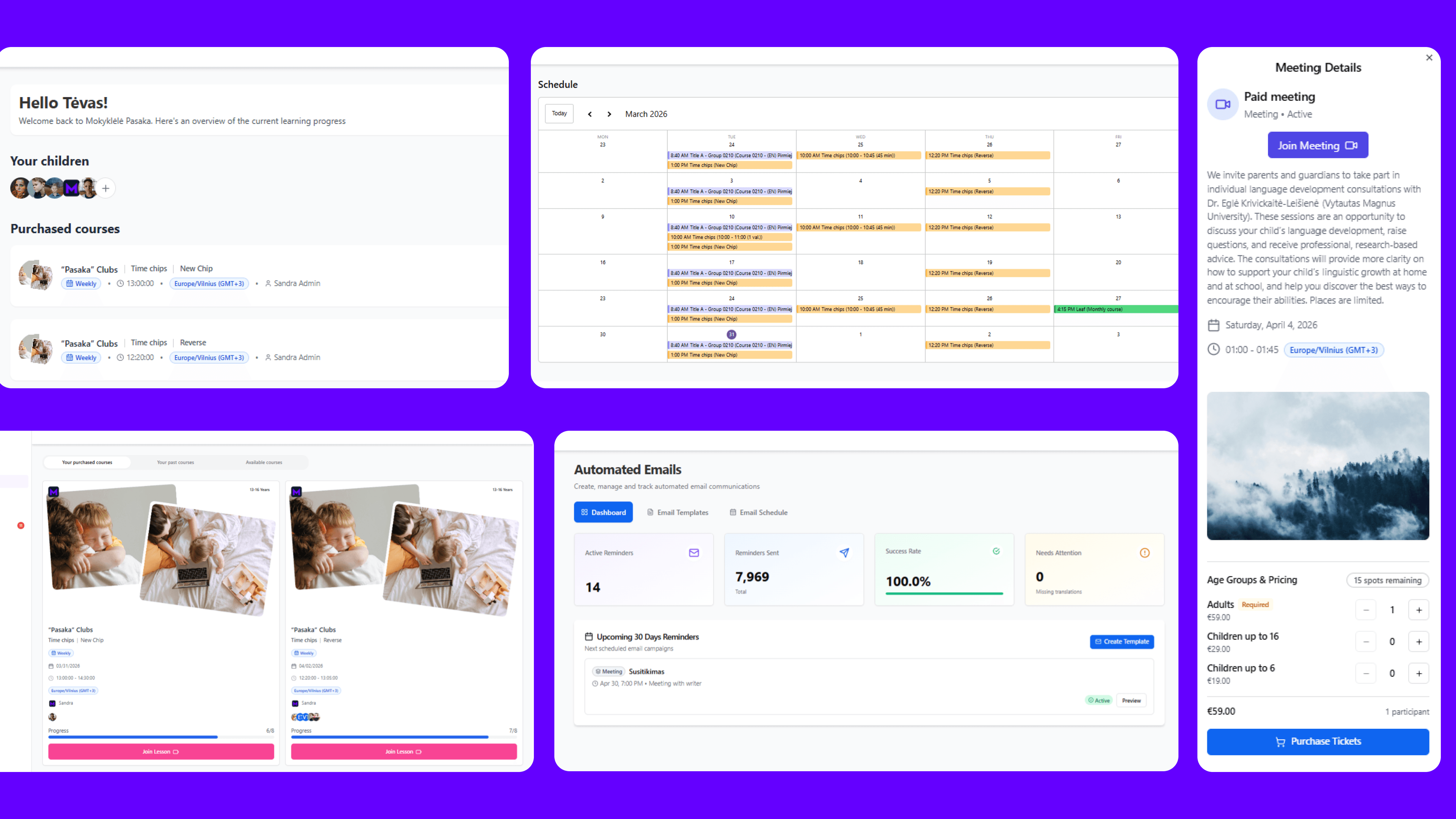
The solution was one connected system: Next.js, NestJS, and PostgreSQL at the core, with Stripe for payments, Calendly for booking and availability, and Zoom and Google Meet for live classes. Meeting links generate automatically when a booking is confirmed. A custom in-app calendar shows users their schedules without leaving the platform, with full cross-timezone support.
A multilingual public website built on PayloadCMS lets the organization's staff update content directly in multiple languages - no developer involvement needed for routine changes.
We didn't build a video conferencing tool. Zoom already exists. Knowing where to draw that line is as important as knowing what to build.
The team: Three people over six months - a developer, a QA engineer, and a project manager.
The result: Parents manage multiple children's schedules, payments, and messages in one place. Messages are tied to a specific child, so a parent with three kids enrolled always knows which conversation belongs to which class. Teachers handle class materials, attendance, and communication from one dashboard. Administrators run users, courses, finances, and content from a single system (opens in new tab).
Roll Out in Phases - Not All at Once
A full school-wide launch on day one is the most reliable way to trigger panic and kill adoption. Phases exist for a reason.
Phase 1: Pilot with a small, willing group. Pick teachers and admins who are genuinely curious, not resistant. Their job is to find every sharp edge before it reaches everyone else. Run it for two to four weeks. Track login rates, task completion, and bugs. Then run a real debrief - not a formality.
Phase 2: Fix what the pilot found. This is the step most organizations skip. The findings sit in a doc, the launch date doesn't move, and the same problems hit everyone. Treat the debrief as a hard gate. Nothing moves to full rollout until critical issues are resolved.
Phase 3: Expand with training built in. Training is not a PDF and a 30-minute video. Run short sessions per user role - what a teacher sees is different from what a parent sees. Document the most common workflows. Build an ongoing support channel. Check in regularly in the first month.
Business consequence: Teams that feel unconfident using a new tool stop using it. Adoption doesn't fail at launch. It fails in week three when the first real problem hits, and there's no support.
Checkpoint: If you haven't scheduled role-specific training sessions before launch day, you're not ready to launch.
Measure Outcomes, Not Activity
The mistake most schools make after launch is measuring activity instead of outcomes. Logins are activity. What actually matters is whether grading takes less time, whether parents can find what they need without calling admin, whether teachers spend less time on admin and more time teaching.
A simple way to track this:
- Weekly - check for system errors, support requests, and who is actually using what.
- Monthly - compare task completion rates against where you started, and do a quick satisfaction check with staff.
- Per term - go back to the goals you set before launch. Is feedback reaching students faster? Are admin queries down?
The numbers will tell you what to fix next. And if something isn't working, you'll catch it early instead of six months later when everyone has quietly gone back to spreadsheets.
Business consequence: Without a pre-launch baseline to compare against, you have no way to know if the investment worked - or justify spending more.
Checkpoint: Set your baseline before launch. Not after.
The Failure Modes Worth Knowing in Advance
Most edtech implementations that struggle share the same patterns. Knowing them in advance means you can design around them.
Scope creep during development. Requirements expand continuously, the build stretches, and by the time the software launches, the school's needs have shifted. Fix this with clear phase boundaries and explicit sign-off before each phase begins.
Integration underestimated. Connecting a new platform to existing systems - student information systems, payment processors, HR databases - consistently takes longer than anyone expects. Budget for it. Test integrations in staging before they touch production data.
Training treated as optional. Adoption collapses when people feel unconfident. Build training into the timeline and budget from day one, not as a last-minute add-on.
No ownership after launch. Software needs someone responsible for it - fielding issues, managing relationships with vendors or developers, prioritizing what gets built next. Organizations that don't assign clear ownership find their platforms drifting into neglect within a year.
Business consequence: Each of these failure modes has a compounding effect. Scope creep delays launch. Delayed launch compresses training time. Compressed training kills adoption. Lack of ownership means the problems never get fixed.
What It Actually Looks Like When It Works
It's a parent who logs in, sees both children's schedules, pays for the next term, and messages the teacher - all without leaving the platform. It's a teacher who adds attendance, shares materials, and checks homework completion from one screen.
Not impressive demo screens. Not a feature list that sounds good in a board meeting. A system that makes the work of education less taxing for the people doing it - consistently, day after day.
How Mygom Can Help
If you're evaluating whether custom software is the right path for your institution, the question to start with isn't "what should we build?" It's "what's costing us the most time and trust right now?"
Here's how we work:
We map one critical workflow with you first - not the whole institution, just the process causing the most friction. We talk to the people living with the problem. We build fast, in phases - so you see results before committing the full budget.
Ready to stop working around your tools?
Get in touch (opens in new tab) and let's find out whether custom software is the right answer for you.