Custom Web Application Development Simplified Guide
What if the app running your business knew your workflow better than you do? That's the promise and the challenge of custom web application development. This approach builds a web tool designed around your unique processes. It's not based on someone else's idea of "average."
According to Hostinger's 2025 web hosting statistics (opens in new tab), the global web hosting market is projected to reach $355.81 billion by 2029, driving businesses to adopt custom solutions for a competitive edge. Off-the-shelf SaaS isn't always enough.
But here's where most business owners hit a wall. You hear "custom" and picture runaway budgets. You think of endless delays and projects that never launch. Maybe you've been told it's only for tech giants. Or that only SaaS can move fast or scale well. Let's bust that myth with two real stories.
First, meet the e-commerce retailer struggling with manual order processing. They tried every SaaS tool. None fit their split-stock warehouses or custom shipping rules. A tailored web app changed the game. Orders now process in seconds, not hours. Their team finally sleeps at night.
On the other hand, there's the startup founder who thought she needed a custom CRM to track leads. After mapping her workflow, it turned out an existing SaaS platform did 98% of what she needed. It cost 1/20th the price.
Custom web application development isn't about reinventing the wheel. It's about building a digital engine that fits your business like a glove when nothing else will do. The key is knowing when "custom" is right and when SaaS or no-code gets you there faster and cheaper.
In this guide, you'll learn how to make that call step by step. You'll understand what custom web apps really are. You'll weigh costs versus benefits. You'll see how real businesses made their choice and what happened next. You'll get tools to break down project phases. You'll learn to estimate timelines and budgets. And you'll spot red flags before they become disasters.
Curious if custom is right for you? Want to avoid common traps before spending a cent? Read on. By the end of this guide, you'll know exactly which path to take for your next big idea.
Prerequisites
Before you explore custom web application development, you need three things in place:
- A clear business problem: Write down the specific pain point. For example: "Order processing takes 3 hours per order" or "Our CRM doesn't track custom lead stages."
- Budget range awareness: Know if you can invest $15K minimum. Custom builds rarely cost less. If your budget is under $10K, start with SaaS or no-code first.
- Time to collaborate: Plan to spend 3-5 hours per week with your dev team during the first month. This covers workshops, feedback sessions, and testing. You can't delegate this and disappear.
Should You Build Custom? A Decision Framework
Custom vs. No-Code vs. SaaS
Choosing the right platform can feel like picking tools for a home renovation. Do you need a custom-built house? A modular prefab? Or just some clever upgrades to your current space?
Custom web application development is like hiring architects to design every detail for you. You get max flexibility. But you pay more up front. You get software tailored to your workflow and brand. You have full control over data and integrations, as explained in Quixy (opens in new tab).
For example, an events company required ticketing integration with five different payment providers. No SaaS platform could handle it. Their custom system paid off within one year by cutting transaction fees.
No-code platforms are more like IKEA furniture. You assemble pre-made pieces fast. Great for testing ideas or handling simple processes without coding skills. But when you want that invisible storage under the stairs, such as integration with legacy systems or bespoke automation, limitations appear.
SaaS products offer ready-made solutions with fixed costs and quick setup times. They work best when your needs match common use cases. Think CRM or payroll. For instance, a retail startup streamlined operations using Shopify's out-of-the-box e-commerce features. They didn't build their own shopfront from scratch.
How to Decide: Four Key Questions
Follow these steps before investing in any solution:
Step 1: Identify unique workflows
Write down what makes your process different. If 80% fits generic tools, consider SaaS. If your workflow has unusual steps or rules, consider customizing it.
Step 2: List integration requirements
Name each system or tool that must connect. Examples: Salesforce, QuickBooks, Stripe. More than two complex integrations? Lean toward custom web application development.
Step 3: Assess scalability
Estimate user growth in one year and three years. If growth will strain off-the-shelf solutions, plan for custom solutions, as recommended by ScienceSoft (opens in new tab).
Step 4: Define ownership needs
Consider if you need full control over features and data. Full ownership favors custom. Less critical means that SaaS or no-code solutions are fine.
A Salesforce guide (opens in new tab) highlights that businesses needing rapid change or deep customization often see better ROI from software tailored to their strategy.
Checkpoint: Verify if at least two of the above criteria strongly indicate flexibility or unique integration needs. If yes, move forward with custom. If not, consider exploring SaaS or no-code solutions first.
The Four Phases of Custom Web Application Development
Building a custom web app is like constructing a house. You need a clear plan. You need the right tools. And you need steady hands at each step. Let's break down the four critical phases - what you'll do, what to expect from your developer, and how you'll know you're on track.
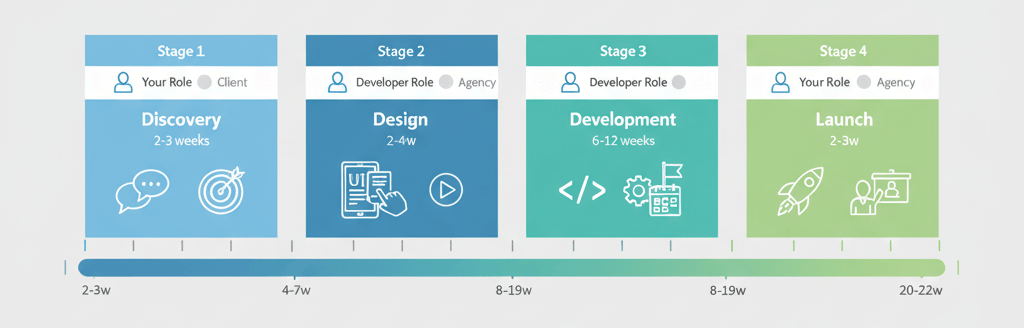
Phase 1: Discovery - Mapping Goals and Success
Start by clarifying where you want to go and why. In this phase, you:
- Define your business goals (for example: "Cut order processing from 2 hours to 15 minutes").
- List pain points with current systems.
- Identify key users and their needs.
Your role: Provide business context. Grant access to real users or team members. Share relevant documents like process maps or reports.
The development partner's role: Run workshops. Produce a requirements document. Build an initial project roadmap.
Timeline: 2-3 weeks
Checkpoint: You should receive a summary outlining goals, user stories, technical constraints, and measurable success criteria. For example: "Success means onboarding five new vendors per week without manual email follow-ups."
Data from Quixy (opens in new tab) shows that successful discovery reduces downstream rework by over 30%.
Phase 2: Design - User Experience and Wireframes
This phase turns ideas into clickable blueprints.
First, review sketches of core workflows (wireframes).
Next, test simple prototypes. No code yet.
Then, give feedback on look-and-feel before anything gets built.
Your role: Provide input on branding preferences. Review wireframes with your team for usability.
The development company's role: Create user flows and early designs using tools like Figma or Adobe XD.
Timeline: 2-4 weeks
Checkpoint: Expect interactive wireframes showing real user journeys. Examples: "Add new product," "Approve invoice," or "Generate report." Verify these match your unique workflows before coding starts.
A ScienceSoft guide (opens in new tab) emphasizes the importance of aligning stakeholders during project scoping to minimize scope changes and prevent budget overruns later.
Phase 3: Development - Coding, Testing, and Iteration
Now the building begins. The process of designing turns into code powering your business logic.
First, developers set up infrastructure. This means cloud hosting and databases.
Next, they build features in sprints. You'll see demo progress every one to two weeks.
Then, they run tests with sample data. Bugs get fixed iteratively.
Finally, you invite users for beta testing midway through the build.
Your role: Answer questions about edge cases. For example: "What if an order is canceled after shipping?" Help test features as they go live in staging environments.
The development company's role: Provide sprint demos so you see working software, not just promises, every two weeks.
Timeline: 6-12 weeks minimum for even simple apps
Checkpoint: At mid-point, verify core workflows are functional with real data. For example, uploading invoices triggers correct approvals. Each sprint should deliver visible progress toward launch-ready features.
Phase 4: Launch - Go-Live and Early Support
Finally, the big moment! But reliable launches are never "set it and forget it."
First, migrate real data securely.
Next, train your team using video walkthroughs or live sessions.
Then, monitor performance post-launch. Handle urgent fixes fast.
Finally, collect user feedback for quick wins after the release.
Your role: Provide final sign-off on data imports. Coordinate staff training dates.
The development company's role: Manage deployment to production servers. Be prepared for potential early support issues during the first month after go-live.
Timeline: 2-3 weeks, including training and support ramp-up
Checkpoint: System is live with real users performing daily work. For example: placing orders end-to-end. Any critical bugs are resolved within days, not months, for smooth adoption across your team.
Custom web application development is rarely a linear process. However, following a structured phased process makes complex projects manageable, according to Salesforce (opens in new tab). From kickoff to launch usually takes at least 12-20 weeks. Plan for even longer if you need advanced integrations or work in regulated industries. Map out your digital future together with developers who value transparency at every turn.
If you want to explore custom web app development services (opens in new tab), look for partners who break down phases clearly and show you working software every step of the way.
Transparent Budget Ranges for Custom Web Apps
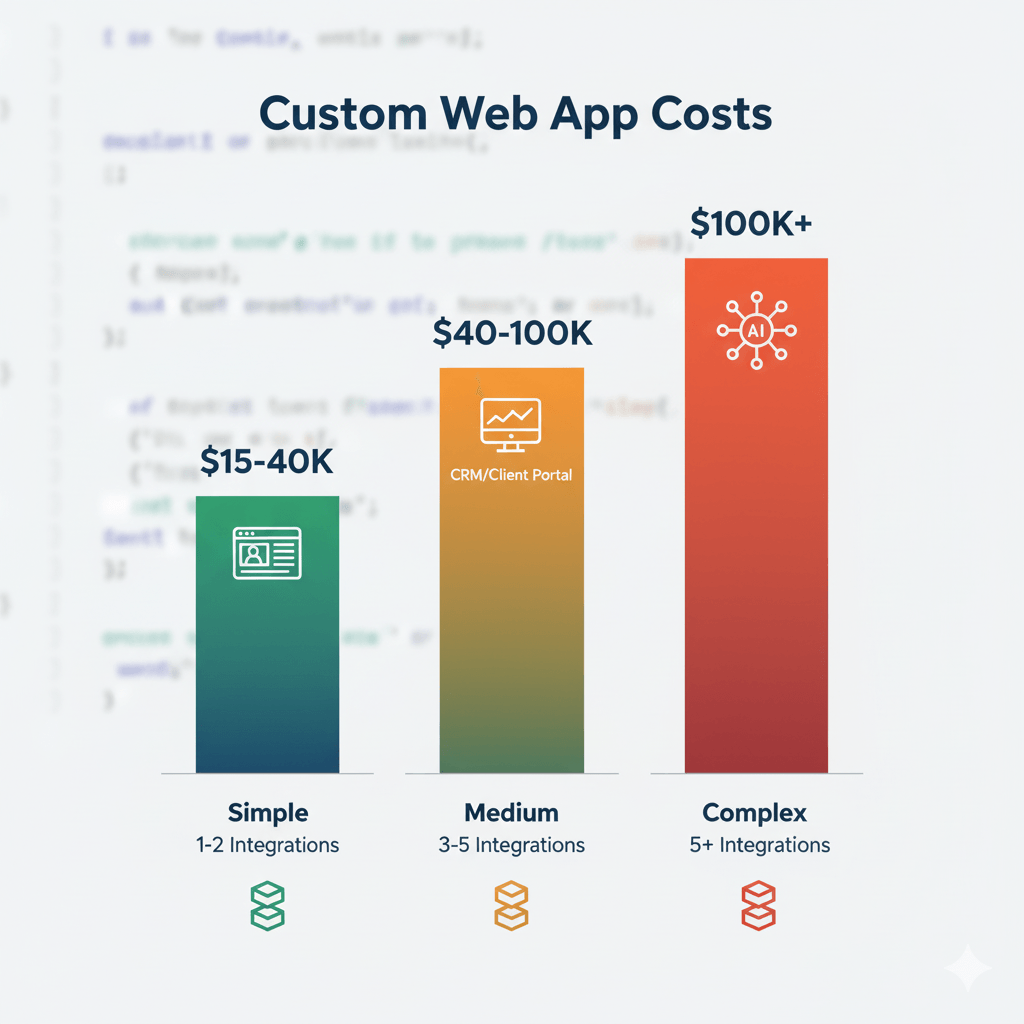
Custom web application development costs vary like building a house. You pay more for complexity, integrations, and polish.
Simple apps ($15K-$40K): Think internal dashboards. These cover core features, basic design, and minimal integrations. For example, a team task tracker with email notifications.
Mid-complexity apps ($40K-$100K): Booking engines, custom CRMs, or client portals. Here you're adding user roles, automations, and two-way sync with outside tools. Need custom reports? That fits here too.
Complex apps ($100K+): This tier often means multi-system integration or strict compliance like HIPAA. Examples include real-time collaboration tools, advanced analytics platforms, or apps with AI features.
What Drives Cost?
Scope is king. A ScienceSoft guide (opens in new tab) recommends prioritizing features and delivering an MVP first to optimize investment and prevent budget overruns.
Design rounds also add up fast. Each revision cycle takes time. The more polish you want, the higher the cost.
Common surprises include:
- Third-party fees (payment API charges)
- Overlooked content migration (moving old data)
- Post-launch fixes if requirements shift late in the process
Preparation Checklist: What You Need Before Starting
Get these ready before contacting an application development company:
- Define your business goal in one sentence. Example: "Let field techs submit timesheets from mobile devices in under 30 seconds."
- List essential features versus "nice-to-have" extras. Draw a line. Separate the must-haves from the maybe-laters.
- Gather examples of interfaces you like. Even screenshots help. Show your developer what "good" looks like to you.
- Identify any must-have integrations. For example: Salesforce, Stripe, or QuickBooks.
- Assign a decision maker on your team. One person who can say yes or no without waiting for committee approval.
What You Don't Need
You don't need wireframes or technical specs. That's what application development services are for! Don't worry about knowing the tech stack. Focus on what success looks like for your business.
Custom web app development offers maximum flexibility with software tailored to your workflow, though at higher upfront costs, according to Quixy (opens in new tab).
Red Flags vs. Green Flags When Choosing Developers
Choose wisely. Your partner shapes outcomes as much as your idea.
Red Flags
Watch out for these warning signs:
- Vague proposals: "We'll deliver best practices…" means nothing.
- No clear process breakdown: If they can't explain phases, run.
- Communication gaps or slow replies: You'll need fast answers during the build.
- Pushback when you ask about ownership of code/IP: You should own what you pay for.
- No visible portfolio of similar work: Ask to see past projects like yours.
Green Flags
Look for these positive signs:
- Transparent estimates tied to specific features: "User login costs $X, payment integration costs $Y."
- Breaks down phases with timelines and checkpoints: You know what's coming next.
- Proactively shares risks: "Here's what could delay us…" shows honesty.
- Openly references previous custom web application development results: Real case studies with real numbers.
- Provides direct access to project leads: Not just salespeople. You talk to the people building your app.
A great development company will make you feel guided, not lost, from day one.
Post-Launch Reality: Ongoing Costs and Maintenance
Your app doesn't stop needing care after launch. Think of it like tending a garden. Regular attention yields lasting results.
What to Expect Post-Launch
Bug fixes: Even well-tested apps hit edge cases in the real world. Budget 5-10% of the build cost annually for fixes.
Feature updates: Your business evolves. Your app should too. Plan to add features every 6-12 months.
Security patches: Frameworks and libraries get updates. Your app needs them to stay secure.
Hosting and infrastructure: Cloud servers cost $50-$500/month, depending on traffic and data storage.
Support and training: New hires need onboarding. Users need help. Budget for ongoing support hours.
Is Custom Web App Development Right for You?
You've seen what it takes to bring a custom web app to life. You now understand the real trade-offs. The investment. The commitment. The ongoing care your solution will need. The right fit depends on your vision, urgency, and appetite for long-term control.
Before you leap, ask yourself:
- Does my business model require unique workflows or integrations?
- Am I ready for ongoing updates instead of one-and-done projects?
- Can I dedicate team time to feedback, not just sign-off?
If these answers are yes, and you want software tailored to grow with you, a custom build could be your unfair advantage.
The journey doesn't end at launch. Maintenance and new features keep your platform competitive as market shifts occur.
Self-Assessment: Three Final Questions
Question 1: If you could wave a magic wand and fix one workflow bottleneck in your business today, what would it be? If the answer is "none" or "something small," you probably don't need custom yet.
Question 2: Are you willing to invest 12-20 weeks minimum before seeing a working product? If you need results in 4-6 weeks, consider exploring SaaS or no-code solutions first.
Question 3: Do you have at least $15K budgeted for the initial build, plus 20-30% annually for maintenance? If not, start with simpler solutions and revisit custom when you're ready.
Next Steps: Get Expert Guidance
If you're weighing options or facing uncertainty about next steps, don't go it alone. Book a free strategy call with Mygom.tech (opens in new tab). We'll help you map out the smartest path forward. No strings attached.