Why Off-the-Shelf Automation Tools Keep Failing
Most teams start with the same mistake. They see a slick demo, sign the contract, and assume everything will fall into place. Six months later, they're still fighting the tool instead of using it.
You've seen it. The demo looks perfect. The pricing makes sense. Implementation starts with optimism. Three months later, your team is drowning in notifications, your pipeline is leaking deals, and you're paying monthly fees for software nobody trusts.
Here's the truth - generic automation tools aren't built for your business. They're built for everyone, which means they're built for no one.
The chaos you're fighting isn't a people problem. It's not a training problem. It's a mismatch between how your team actually works and how some product manager thinks teams should work.
We've watched sales ops leaders burn through budgets patching tools together. We've seen teams drown in vendor contracts while deals slip through cracks. We've sat with exhausted teams who automation was supposed to help - only to find them working harder than before.
The market keeps selling you faster. We think you need something different. Not more features. Not flashier dashboards. Just automation that bends to your workflow instead of forcing you to bend.
This guide shows you why off-the-shelf tools keep failing you, and what to do about it. By the end, you'll know exactly where the cracks are in your current setup and how to fix them without ripping everything apart.
Let's start with the part nobody wants to admit - the tools aren't the problem. The approach is.

Three Things to Sort Out First
Before you tackle workflow automation, get three things straight:
Map your current workflow. Write down every step your team takes from first contact to closed deal. Don't skip the "unofficial" steps. Those matter most. Teams that skip this waste months forcing reality into fantasy templates.
Get stakeholder buy-in. Your sales lead, ops manager, and IT need to agree on the problem. Without alignment, automation becomes another shelfware. You'll lose weeks just because sales and ops define "qualified lead" differently.
Set clear success metrics. Pick two or three numbers that matter. Hours saved per week. Error rate drop. Revenue recovered. Vague goals like "work better" guarantee vague results.
Checkpoint: If you can't draw your workflow on one page or name three metrics that prove success, stop. Fix that first.
Step 1: Diagnose Why Off-the-Shelf Tools Fail You
The Budget Trap - How Workflow Management Software Eats Cash
Most teams treat workflow tools like magic bullets. Buy the license. Connect a few apps. Watch savings roll in.
Here's reality - budgets vanish into monthly fees, onboarding sessions, and endless setup calls. We worked with a SaaS business whose "best-in-class" tool cost $12,000 in year one. They hadn't automated a single process yet.
Licensing is just the start. Every connection requires setup time from your best people. Hours lost chasing tickets instead of closing deals or serving customers. 1Password (opens in new tab) found teams see 4x ROI if they optimize before renewals. Most don't get there before the next invoice hits.
Then come the hidden costs. Training sessions that pull teams from real work. Consultants who speak in jargon. Add-ons that promise to "finally make it work."
Business consequence: When your team spends more time setting up tools than using them, you're not saving money. You're bleeding budget while competitors move faster.
Checkpoint: If setup costs exceed three months of expected savings, the math doesn't work.
Procurement Chaos: When Vendor Sprawl Kills Deals
Procurement teams should enable growth. Instead, they're playing whack-a-mole with vendor risk. Every new tool brings security reviews, compliance forms, and data privacy checks.
The chaos starts when different teams pick different tools. Marketing adopts one. Sales picks another. Ops chooses a third. None of them talk to each other. Gartner notes (opens in new tab) that enterprises with sprawling MarTech stacks spend 40% more on technology due to this fragmentation, creating data silos and operational delays.
Deals stall for weeks while legal and IT debate who owns which dataset. Procurement drowns in contracts. Data scatters across systems. When a customer calls with a question, no one has the full story.
Business consequence: While your team debates tools, competitors close deals. Lost quarters don't come back.
Checkpoint: If procurement spends more time vetting tools than enabling revenue, you've lost the plot.
The AI Hype Gap - Smart Tools That Act Dumb
AI workflow tools are everywhere now. They promise smart automation that learns your business overnight. The truth? Off-the-shelf AI is only as good as its context.
Generic AI learns from everyone's data - which means it optimizes for average, not for your business. Your competitors use the same tool with the same training. Where's your advantage?
One B2B SaaS startup saw a 40% drop (opens in new tab) in trial-to-paid conversion after no-code tools failed to handle scaling integrations between HubSpot and Salesforce, creating workflow gaps.
These tools miss your industry terms. They don't understand your priority logic. They can't adapt to how your team actually works. So "smart" automation makes dumb decisions.
Most AI workflow tools require months to train on real data before they deliver value. But quarterly targets don't wait. Teams need results now, not "eventually."
Business consequence: If your AI can't adapt to your process fast enough to matter this quarter, it's a shiny object draining resources from real results.
Checkpoint: Demand proof of concept with your actual data before signing. If the vendor can't show results in 30 days, walk away.
Step 2: Build Custom Workflow Automation That Fits Reality
Design Around Your Team's Actual Behavior
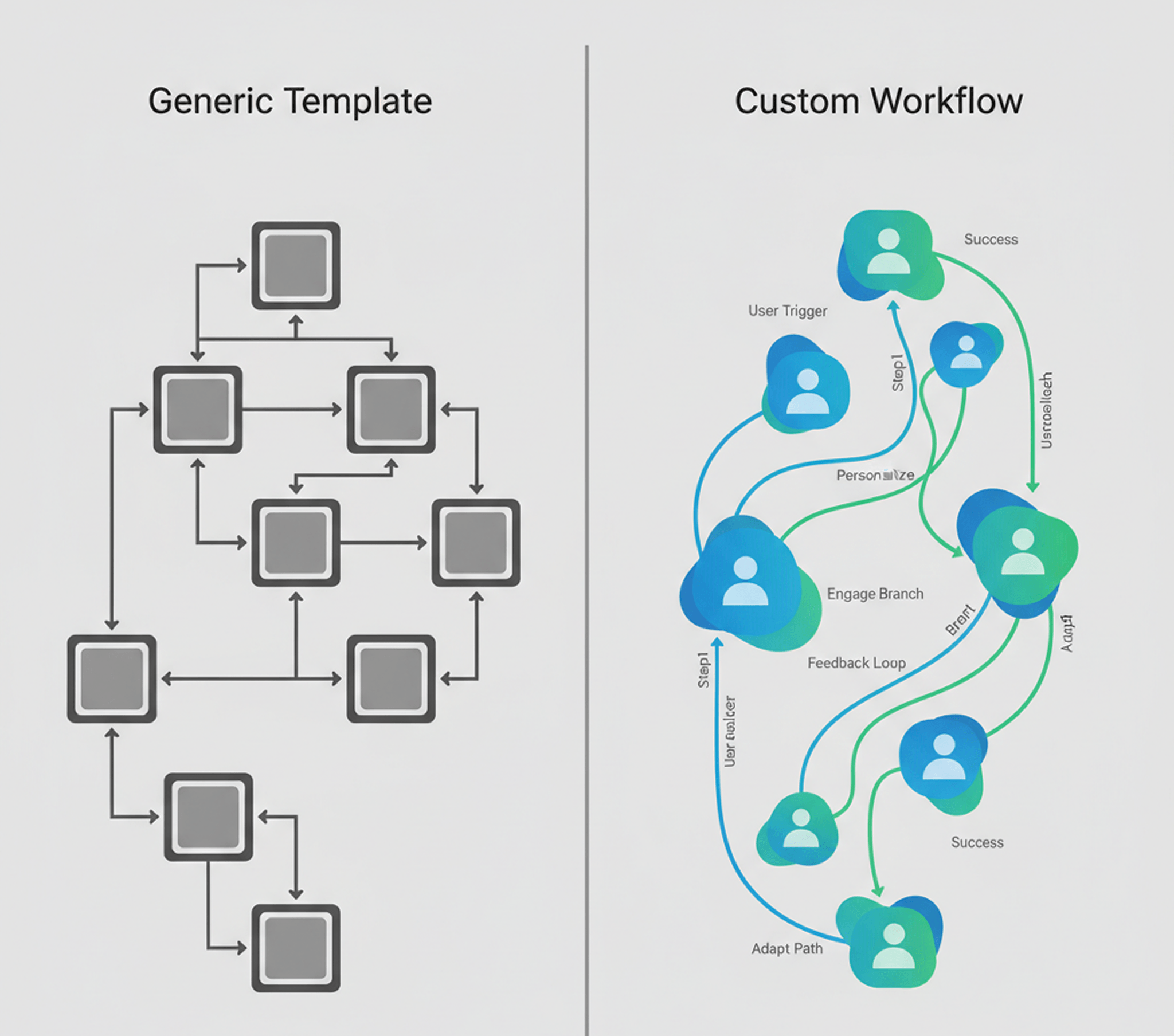
Most workflow automation gets one thing wrong. It forces your business to fit its template. It should be the other way around.
Every team has unwritten rules and quirks. No off-the-shelf tool understands those. The moment you cram your unique process into a generic system, chaos follows. Missed steps. Angry customers. Lost deals.
Here's what custom means in practice: You map every handoff, every approval, every exception. Then you build software that mirrors reality - not some consultant's idea of "best practice."
When you do this right, adoption is instant. Why? Because the system feels familiar. It works the way people already work. No retraining. No resistance.
Business consequence: When workflow fits reality, teams use it. When it fights reality, they build shadow systems in spreadsheets - and your investment dies.
Checkpoint: If your workflow feels like forcing a square peg into a round hole, it's costing you real money.
We faced this with our own content process. Our team had great ideas, but dreaded writing - case studies piled up in Notion while we paid $300 per outsourced post that never sounded like us. So we built a custom AI content generator for PayloadCMS (opens in new tab) that researches, writes in our voice, and publishes technical content in minutes instead of days. Custom automation solved our bottleneck.
Lessons from Failed Deployments We've Rescued
We've seen too many teams lured by shiny workflow tools. They hit a wall at rollout. Why? These products assume uniformity across companies. They ignore the complex human factors baked into each process.
The pattern repeats: A tool works fine for simple transactions. But any exception or custom rule triggers endless ticket loops. Frustrated staff step in manually anyway. The tool becomes digital paperwork, not automation.
Or worse: The system flags so many false positives that teams spend more time overriding bad calls than they did before automation. Trust dies. Adoption crashes.
The lesson is clear: deep collaboration matters more than feature lists. Human-centered design means building with teams - not just for them. That's how adoption sticks and results last beyond launch day.
Business consequence: Failed deployments don't just waste money. They breed cynicism. When the next tool comes along, teams roll their eyes instead of engaging. You lose the ability to change anything.
Checkpoint: If you want lasting impact from workflow automation, start by solving your problems - not someone else's idea of best practice.
Step 3: Prove Value With Data and Redeploy Your Team
Track Real Numbers - Before and After
Manual work kills velocity. Teams spend hours each week manually updating CRM records. Copy-paste marathons that drain morale and miss crucial follow-ups.
When you deploy custom workflow automation, track what matters: hours saved, error rate, and revenue impact. Check these metrics weekly. That visibility builds trust, justifies investment, and funds the next phase.
The wins show up fast. Manual hours drop. Error rates on deal status updates fall. Revenue recovered from lost deals climbs. Real money back in your accounts - not theoretical gains.
Business consequence: Results aren't about "efficiency." They're about less waste, fewer mistakes, and more revenue where it counts.
Checkpoint: If you can't show hard numbers after 30 days, your automation isn't working. Adjust fast or kill it.
Redeploy Freed Talent to Growth Work
The best measure isn't how many tasks get automated. It's what your people do next.
When you automate repetitive work, watch where that freed time goes. The win isn't just efficiency - it's redirecting talent toward growth. Support teams can focus on customer onboarding instead of data entry. Sales reps can build relationships rather than update records. Engineers can solve problems rather than chase tickets.

Here's the shift - automation handles repeatable tasks. Humans focus on judgment calls, relationship building, and creative problem-solving. That's where competitive advantage lives. Not in who can copy-paste faster.
Company-wide morale improves when people feel like they're using their brains again. They stop dreading routine workdays and start chasing opportunities. That energy compounds into retention gains, upsell conversations, and innovation you can't measure in hours saved.
Business consequence: True success means freeing your best minds from busywork so they can drive innovation - and your bottom line - higher than ever.
Checkpoint: Map where freed time goes. If it vanishes into more busywork instead of strategic work, you're wasting the win.
The Path Forward - From Tool Chaos to Team Brilliance
We've helped teams escape the maze of mismatched tools. The pattern is always the same: leaders stop chasing features and start building real solutions. Workflows get sharper. Teams reclaim time for growth instead of patching systems. Deals close faster. People leave work energized - not drained.
This shift isn't about having more tools. It's about owning your process. The companies winning right now aren't the ones with the most software. They're the ones who built systems that match their reality. They automated the chaos, not the strategy. They freed their people to think, not just execute.
Off-the-shelf tools will always have a place for simple, standardized tasks. But competitive advantage lives in the 20% of workflow that's uniquely yours. That's where custom automation pays back.
How Mygom Can Help
If you're tired of feeling boxed in by generic automation, we can help. At Mygom, we don't sell software off a shelf. We sit with your team. We map your real workflow - quirks, exceptions, and all. We build systems that fit how you actually work.
Here's how we work:
- We deep dive into your workflow. We identify where generic tools fail you.
- Fast prototype. Usually within two weeks - you see results before committing big budgets.
- Build, test, deploy. Your team is involved at every step.
Our clients (opens in new tab) don't just get automation. They get systems that grow with them. When your business changes, your workflow adapts. No vendor lock-in. No endless license renewals. No feature requests disappearing into a black hole.
Ready to stop fighting your tools?
Let's build automation that actually works for your team.
Gabriele J.
Marketing Specialist