AI Implementation for Business: How It Works
AI Implementation for Business: Where to Start and What the Process Looks Like
AI implementation is the work of putting an AI system into a business process that already exists, and keeping it running afterwards. It is not a purchase and it is not a pilot that lives in a slide deck. Done properly it starts with an audit of how the work is done today, moves through a narrow pilot, and ends with a system people use without being told to. This is what that process looks like, and how to tell whether your company needs it at all.
We have written before about where manual work usually hides (opens in new tab) and about how to check whether automation will pay off (opens in new tab). This article is the step after those two: you have decided something needs fixing, and now you want to know what the project actually involves.
What AI implementation means in practice
Three things get called the same name, and they are not the same.
What changes | Who decides | When it fits | |
|---|---|---|---|
Buying a tool | Nothing about your process | Nobody, the tool decides | Your process looks like everyone else's |
Automation | Data moves without a person | Fixed rules, if this then that | The steps are predictable every time |
AI implementation | A model makes a judgement inside the process | The model, with a person reviewing exceptions | The work is structured but not identical every time |
The distinction matters because only the third one needs a confidence threshold, an exception path, and somebody who reviews what the system was unsure about. Skip those and you have not implemented AI, you have installed a quiet source of errors.
How to tell whether you need AI at all
The filter we use is exception rate: out of a hundred real cases, how many follow the standard path, and how many need somebody to make a call.
A process where most cases look alike can be automated safely, because the system handles the bulk and a person handles the rest. A process where nearly every case is a judgement call cannot, at least not yet. Automating it early moves the chaos somewhere else and makes it faster.
This is why invoices are usually the first thing we recommend, and why customer communication usually is not. We wrote out that comparison in why invoices are usually where automation should start (opens in new tab).
If you have not measured your exception rate, that is the first task, and it needs no software at all.
The seven steps of an AI implementation
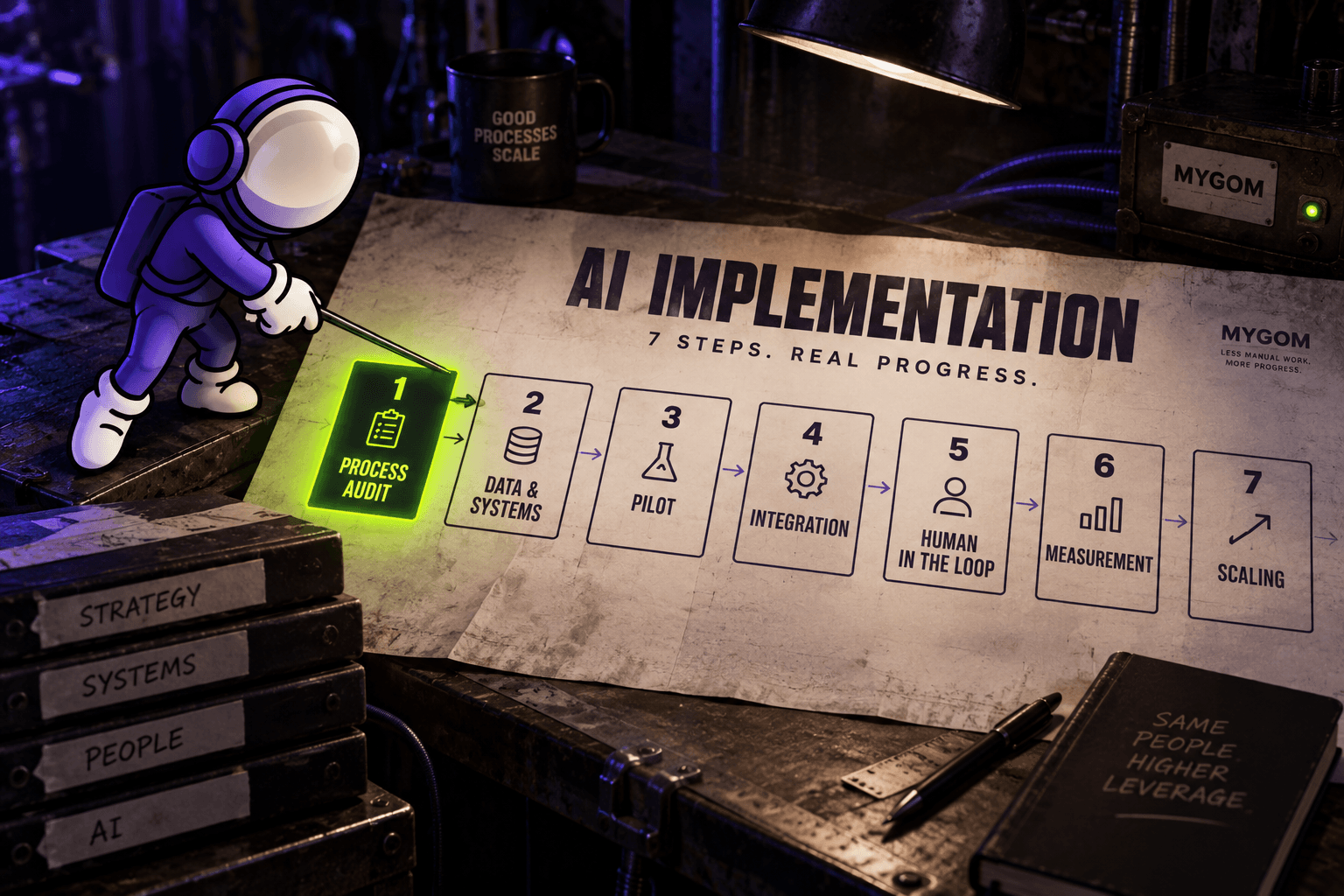
1. Process audit
Before anything is built, the current process gets written down as it actually happens, not as the handbook describes it. How many places the work arrives from. Who touches it. Where it waits. What people do that nobody ever documented.
This is the step companies want to skip, and it is the one that decides whether the rest works. A system built on how a process is supposed to run fails on contact with how it does run.
2. Data and systems assessment
Then the practical question: is the data there, and can it be reached. Which systems hold it, what condition it is in, whether they have an API or whether anything leaves them only as an export.
Most of the unpleasant surprises in AI projects live here, not in the model.
3. Choosing the pilot
One process. Narrow, high volume, low exception rate, and measurable. The purpose of a pilot is not to prove that AI works in general. It is to produce a number inside your own company that makes the next, harder project easier to approve.
Picking something ambitious at this step is the most common way to lose a year.
4. Integration
The system gets connected to the tools people already use. If the output lands somewhere nobody opens, adoption fails no matter how well the model performs.
One decision worth making early: avoid per-case templates and rules that have to be maintained by hand. Template-based approaches break the first time something upstream changes, and something upstream always changes.
5. Human in the loop
Every AI system needs a confidence threshold and an exception list. Anything the system is not sure about goes to a person instead of being guessed at.
A system that is confidently wrong is worse than no system, because people stop checking it. The goal is not to remove the person. It is to stop the person from being the search function: they see the handful of exceptions rather than two hundred clean cases with a few problems buried inside.
6. Measurement
Agree before the build which number should move: time spent, volume handled per person, error rate, software spend. Then check it afterwards. An implementation that shipped but moved no number is not finished.
7. Scaling
Only once the first process holds do you extend: more volume, more edge cases, then the next process. Each one is easier, because the integration work and the trust already exist.
What the first steps look like with us
The AI diagnostic (opens in new tab) takes about three minutes and covers six areas: documents and invoices, reports and KPIs, customer communication, internal operations, sales, and production and pricing.
If it points somewhere worth examining, the audit that follows comes in three depths:
- Quick Look, five business days. A short engineer's look at one process.
- Full Audit, two to three weeks. A structured review of the whole process.
- Deep Dive, five to six weeks. For critical processes where errors are genuinely costly.
The audit fee is credited toward the implementation project, so the assessment is not a separate cost if the work goes ahead.
What this has looked like in practice
From our own systems and client projects:
- Invoice processing: 40% less time spent on manual handling, 10x more invoices handled per person, 95% accuracy reconciling against bank payments, 30% lower software spend. We wrote up the build in detail in how we built our AI invoice automation (opens in new tab).
- Sales proposals: proposal preparation down from three or four hours to between 30 and 60 minutes, with consistent pricing and structure.
- Reports and KPIs: three times faster access to business insight, 30% lower overtime cost.
- Manufacturing: 15% more output, 35% less dispatch time, and three hours a day returned to the production manager.
The pattern across all of them is the same. None were general intelligence problems. They were structured work that a person was doing by hand because the systems involved had no way to talk to each other.
When you do not need AI implementation
Sometimes the honest answer is that the process needs fixing, not automating.
If nobody can say who approves what, automating the flow produces the same confusion faster. If the volume is low, the setup costs more than the work it replaces. If the process changes every quarter because the business is still finding its shape, anything built now gets rebuilt.
And in plenty of cases a standard tool is the right answer, and the correct advice is to buy it rather than build anything.
We would rather say that at the start than six months in.
Where to start
You do not need to know which system you need before you begin. You need to know where the manual work is actually costing you, and whether that area is a sensible first project.
That takes about three minutes with the free AI diagnostic (opens in new tab). It looks at six areas of the business, not one, and it will tell you if the answer is that nothing needs automating yet. If you would rather talk it through first, get in touch (opens in new tab).

Justas Česnauskas
CEO | Founder
Builder of things that (almost) think for themselves
Connect on LinkedIn