How to Set Up an AI Standup Tool for Daily Stand-Ups
How to Set Up an AI Standup Tool in 5 Simple Steps
Ever wish your daily standup could run itself? You're not alone. Standups eat up 15 minutes a day - sometimes more - just to share updates and chase blockers. According to Teamhood's productivity research (opens in new tab), these meetings, while short, still add up fast for every team member. That's where an AI standup tool steps in. Imagine a digital assistant that gathers updates from Slack, JIRA, and Git, then delivers a clear summary before you've had your morning coffee.
So what is StandUp AI? It's your automated standup facilitator. This tool connects to your core apps, pulls real-time progress, flags blockers, and shares concise reports - no manual gathering needed. In this guide, you'll learn exactly what you need to start: the right accounts, permissions, and basic integration skills. Ready to cut meeting time and boost team clarity? Let's set the stage for effortless daily stand-ups.
Step 1: Connect Your Tools for Seamless Updates
Integrating Slack and Project Management
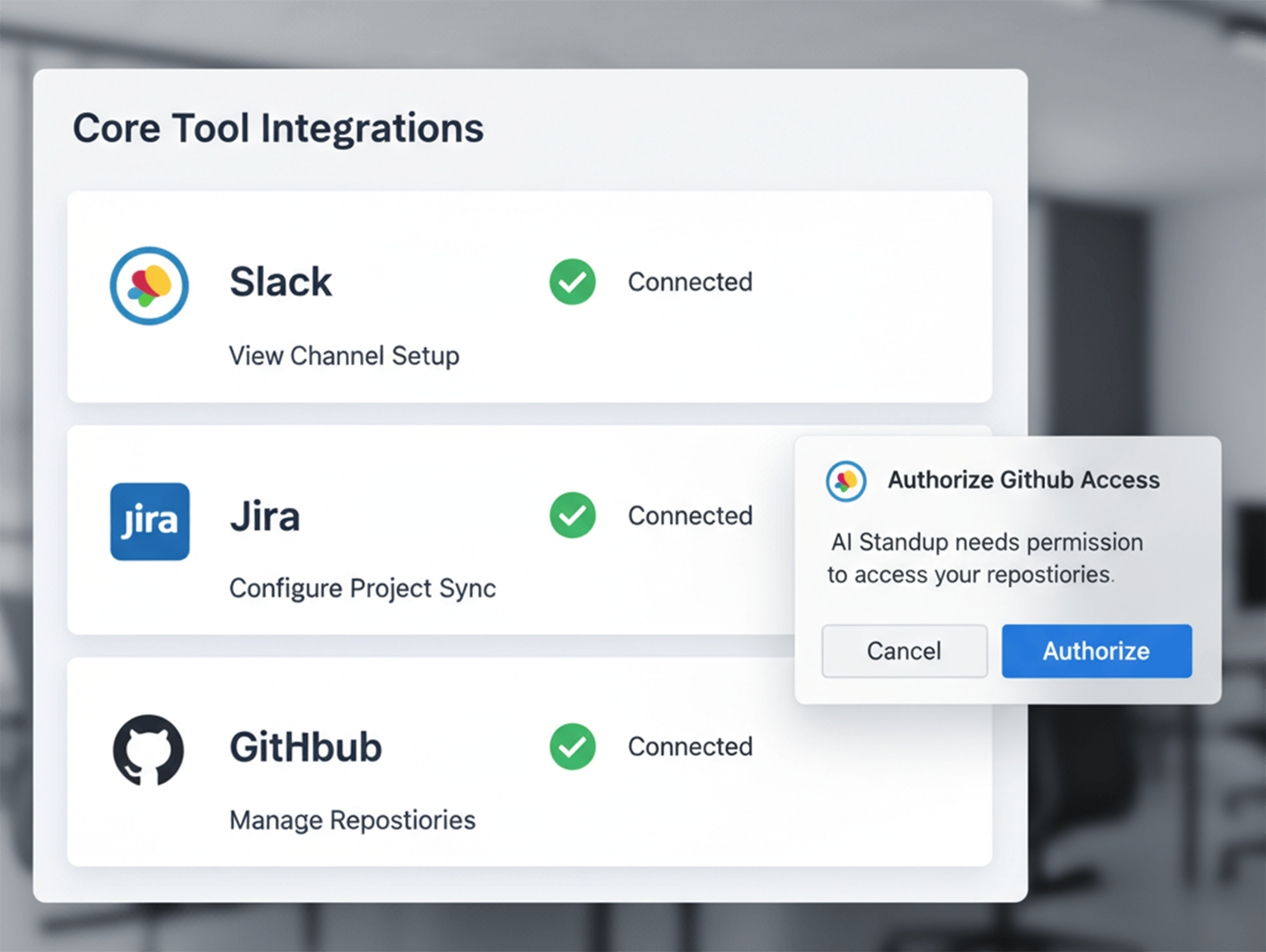
Start by connecting your Slack workspace and project management tool - let's use JIRA as an example - to your AI standup solution. This step lets the AI pull updates from both communication threads and task boards. This integration takes approximately 3-5 minutes to complete.
- Open your AI standup tool's integrations page.
- Click "Connect" next to Slack. Authorize access with your workspace admin credentials.
- Repeat for JIRA, entering your API key or using OAuth as prompted.
Checkpoint: At this point, your integration dashboard should show green checkmarks next to both Slack and JIRA.
If a team member's update isn't showing up, confirm they're posting in the correct channel (like #standup) or that their JIRA tasks are assigned properly. Run a test by adding a comment on a ticket - you should see it appear in the next stand-up summary.
Teamhood's research (opens in new tab) shows that linking status updates directly into daily summaries significantly reduces manual reporting time.
Linking Code Repositories (Git)
Next, connect your Git repository so code commits feed directly into the stand-up meeting summary.
- Click "Add Integration" under Code.
- Select GitHub, GitLab, or Bitbucket.
- Paste your repository URL (e.g.,
https://github.com/acme/webapp). - Grant permission for commit access when asked.
Checkpoint: Verify that pushing a new commit triggers an update in the AI tool's dashboard before proceeding.
Teamplify's feature comparison (opens in new tab) found that teams save significant prep time after linking code repositories - meaning fewer blockers go unnoticed between meetings.
FAQ
- What is the best AI tool for meetings? For auto-summarizing progress and blockers across tools, solutions like Teamplify lead due to real-time integrations.
- Can you use AI to schedule meetings? Yes, many platforms now offer smart scheduling alongside automated stand-up summaries, minimizing coordination overhead even further.
Step 2: Set Up Your AI Standup Tool for Automated Summaries
Now that your tools are connected and feeding data, it's time to configure how the AI processes and delivers those updates.
Configuring Standup Questions
Start by crafting the standup prompts your team will answer each day. Think of these as your morning checklist - clear, tailored, and repeatable. For example:
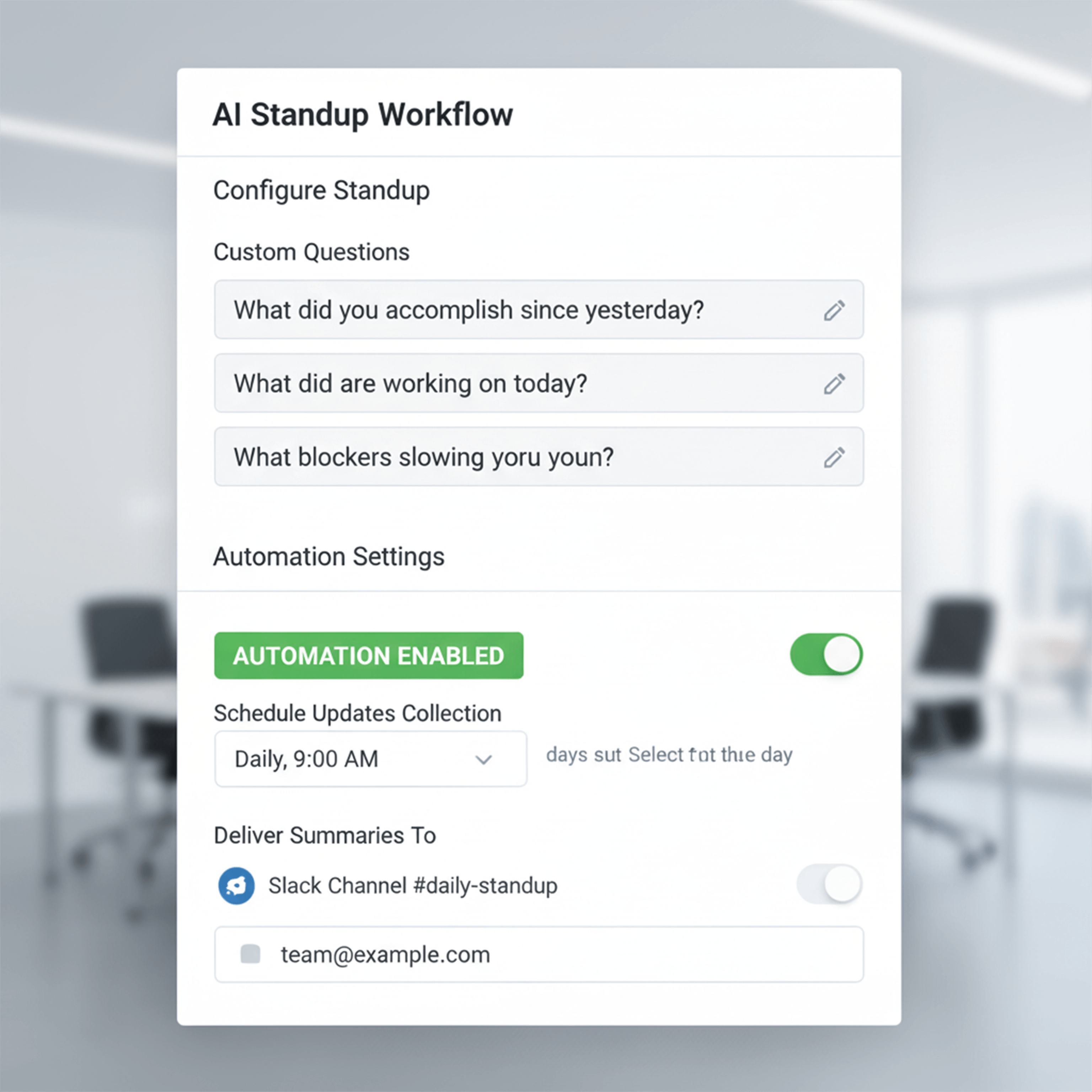
- In the Questions field, type "What did you accomplish since yesterday?" and click Add Question.
- Add "What blockers are slowing you down?"
- Include "What's your top priority today?"
Most daily standup AI note tools let you customize these questions for your workflow or industry. For a design agency, add "Any client feedback?" For a SaaS team, try "Did any builds fail overnight?"
You should now see your custom prompts listed in the dashboard.
Checkpoint: Confirm all three questions you just added appear in the Questions list before moving forward.
Scheduling and Delivery Options
Next, set when and how the AI gathers updates, and delivers summaries to your team.
- Choose collection times (e.g., daily at 9:00 AM).
- Select delivery channels: Slack channel #standups, email digest to managers, or both.
- Enable automatic summarization, so every update is condensed into one clear AI note. You should see a toggle switch turn green, confirming automation is active.
For example, imagine Jane from marketing posts her progress in Slack at 8:55 AM; Sam logs his blocker in JIRA at 9:02 AM; Git pushes land throughout the day. The system scoops up every update and delivers an AI-powered summary by 9:05 AM.
Teamhood's standup template can streamline this process further, acting as a central hub for all project updates.
Verification: You should receive your first AI-generated standup summary via your chosen channel within minutes of setup.
At this point, your meetings become focused check-ins - not status-report marathons.
Is ChatGPT free? According to Lucid's standup guide (opens in new tab), there's a free version with limits; paid tiers offer more features.
Conclusion
You've now set up an AI standup tool that does the heavy lifting - gathering updates, flagging blockers, and surfacing what matters. When a connection breaks or a tool misses data, you know where to check and how to get back on track fast. By tailoring summaries to your team's language and rhythm, you keep everyone in sync without extra meetings or confusion.
If you hit a snag, help is always close, whether through official documentation or dedicated support channels. Your workflow will keep evolving as your needs change. The best part? You're not stuck with static reports, you're building living visibility into your projects.
The bottom line - smart automation is accessible for every team size. Let AI handle the busywork so your people stay focused on real progress - today, tomorrow, and beyond.

Real-World AI Workflow Automation Examples
Boost your team's efficiency with smarter AI workflow automations (opens in new tab). Discover how real AI business process automation transcends digitizing chaos, cutting manual work by 50% and errors by 70%. Learn about modular AI tools that integrate seamlessly with your systems to enhance accuracy, reduce costs, and empower employees to focus on strategic, creative tasks.
Explore inspiring case studies (opens in new tab) on invoice automation, vehicle damage assessment, manufacturing quality control system, and reporting to see AI redefine business processes for scalable, faster growth. Ready to upgrade your workflows? Dive deeper into AI-driven automation and unleash smarter productivity.
Gabriele J.
Marketing Specialist