AI Invoice Automation: Tool or Process?
Invoice Automation: When a Tool Is Enough, and When the Process Needs Fixing
If invoices keep piling up despite having a tool, the problem is rarely the tool — it's the process around it.
Most invoice automation tools speed up one step out of eight. The other seven stay manual, fragmented, and slow. So before buying another tool, it's worth asking: which of the eight steps is actually breaking down for you?
This article helps you tell the difference - and decide what to fix first.
Why are invoices usually the best place to start with automation? We've covered that separately here (opens in new tab) - this article focuses on the harder question: tool or process?
Three different things, one name
Where it hurts | What you need | When it fits |
|---|---|---|
You issue a lot of invoices yourself | An invoicing tool | Simple process, similar clients, few exceptions |
You need to exchange documents in a standard format | An e-invoicing platform | You work with the public sector or large companies |
Invoices arrive from everywhere and someone chases them | Process automation | Many sources, many exceptions, several systems |
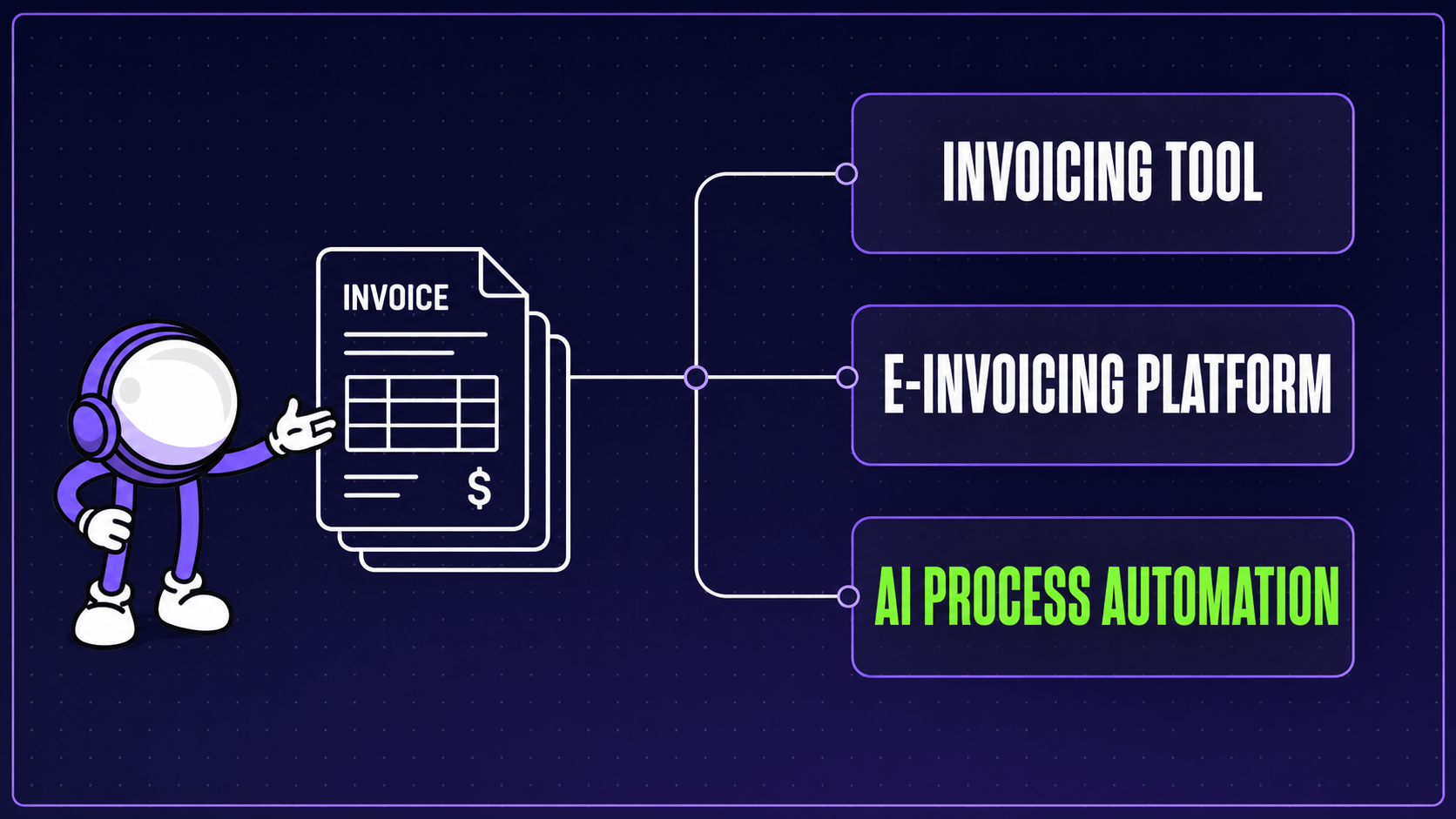
The first two are products. You buy them, connect them, use them. In Lithuania, where we work, invoices to the public sector are required to go through SABIS (opens in new tab), the state's shared invoice administration system, while the VAT invoice requirements themselves sit with the State Tax Inspectorate. If compliance is your only question, a platform is probably all you need.
The third one is not a product. It is a rebuild of your process, and software is only part of it.
The gap between the two shows up in the data. A thematic report prepared by CEPS and EY for the European Commission's EU Payment Observatory (opens in new tab) found that 37% of small European companies sent e-invoices in 2023, against 59.8% of large ones. Small companies are not behind because nobody told them platforms exist. They are behind because a platform does not solve the problem they actually have.
Which type of invoice automation do you actually need?
Ask yourself a few questions:
- How many different places do invoices arrive from each month (email, supplier portals, paper, chat messages)?
- How many people touch an invoice before it reaches accounting?
- How often does someone go looking for an invoice nobody can find?
- How many of your invoices are clean, and how many need a separate decision?
- Does anyone check that the invoice matches what was actually delivered?
If your answers are something like four places, three people, a few times a month, and about half of them clean, then issuing invoices is not your problem. Your process is.
Where does the time in invoice processing actually go?
Not in data entry. Data entry is the visible part, which is why everyone thinks about it.
The time goes between the steps. While the invoice sits in an inbox because someone is on holiday. While somebody works out which project it belongs to. While an approval nobody asked for in writing is waited on. While someone checks whether it has already been paid.
Nobody designed that work. It appeared on its own, because the systems do not talk to each other and someone had to fill the gap. We mapped where those gaps hide across the other areas in Where Your Team Loses Time to Manual Work (opens in new tab).
This is why manual invoice processing rarely shrinks just because you bought a new tool. The tool speeds up one step out of eight.
How does AI invoice automation actually work?
Briefly, without the technical vocabulary:
- The system connects to every channel invoices arrive through
- A model reads the document and pulls out the data, whether that is a PDF, a photo, or an attachment. It does not need a template built for each supplier, and it does not break when one of them redesigns their invoice
- It checks whether the same invoice already arrived through another channel, and whether the line items match the order
- It reconciles against bank payments, at about 95% match accuracy in our own deployment
- It shows a person only what is unclear
Step two is where the AI part earns its place. Rule-based scanning works until a supplier changes their layout or sends a photo instead of a PDF, and then somebody has to go and fix the rule. A model handles documents it has not seen before, which is the difference between automation that runs quietly and automation that turns into someone's maintenance job.
Step five is the one that matters commercially. The goal is not to remove the person. The goal is that the person looks at ten exceptions instead of two hundred clean invoices with those ten hiding somewhere inside.
What that produces in numbers, we wrote up separately in the MYGOM Invoices case study (opens in new tab).
Is a simple invoicing tool enough for you?
Not everyone needs the third option, and it is easier for us to say that now than after a contract is signed.
An invoicing tool will do if:
- Invoices arrive through one channel and look alike
- One person handles them and it is not much work
- Cases needing a separate decision are rare
- Your accounting system already does what it should and nobody complains about it
In that situation, process automation costs more than the problem it would solve. Buy the tool and keep the difference.
Full invoice processing automation is worth it only when an invoice travels through several systems and several people, and every handover is a place where it can get stuck.
Where to start
Not by shopping for tools. By asking where manual work costs you the most. Sometimes the answer is invoices. Sometimes it is reporting, proposals, or customer communication.
That is what we built the free AI Diagnostic for. It takes about three minutes and shows you which area would pay back fastest in your case. If the answer is that nothing would yet, we will say that too.
Not sure invoices are your best starting point? Take the free AI Diagnostic (opens in new tab), about three minutes. And if you would rather talk it through first, get in touch (opens in new tab).

Justas Česnauskas
CEO | Founder
Builder of things that (almost) think for themselves
Connect on LinkedIn