Business Process Documentation Before You Automate

Your operations manager sits down on a Monday to write the company's first piece of business process documentation: how custom orders get quoted. Management wants that process automated, and the first thing engineering asked for was the steps.
She gets four lines in. Order arrives. Check the drawing. Confirm the material is in stock. Calculate the price.
Then she stops.
Because what happens when the client's drawing does not say how precise the part has to be? Sometimes the sales lead calls the client and asks. Sometimes he skips the call and estimates from the last similar order. Sometimes he hands it to the production manager, but only if the order is big enough to justify the interruption, and only if the production manager is in that day.
Ask three people where "big enough" starts and you get three answers. That threshold was never written down anywhere. It is the production manager's judgement, being guessed at by whoever happens to be holding the order.
The gap where line five should be is not a documentation problem. That is the process itself, and this is the first time anyone has looked straight at it.
Business process documentation is a written record of how one process actually runs - its trigger, its steps, its decision points, its exceptions, and its owner - detailed enough that someone who has never done the work can run it correctly. It is not a flowchart. A flowchart shows the route; documentation gives the turn-by-turn instructions.
Most companies discover their real process the moment they try to write it down. Everything before that point describes the process people believe they run. This guide covers the five steps: scope one process, observe it, capture the exceptions, turn it into a procedure, and test its automation readiness before any software touches it.
That sequence matters. Automating a process nobody has described properly does not remove the confusion - it just runs the confusion faster. We wrote a separate article (opens in new tab) about exactly that failure.
Step 1: Pick one process and define where it begins and ends
Pick something smaller than you think is worth doing. That is the trick.
Choose one process that repeats and has a clear starting event. "A customer sends a drawing and asks for a quote" is a process. "Sales" is a department. If you start with something the size of a department, you will still be writing on Friday and you will have finished nothing.
Before you map anything, write down five things:
- Trigger - what starts it.
- End point - what counts as finished.
- Owner - who is responsible for the result.
- Systems - which tools, inboxes and files get used.
- Success - what a correct result looks like.
If you cannot write all five in one short paragraph, stop. The scope is still too wide.
Now the rule most people break. Ask the people who actually do the work. Not the manager remembering how it goes. Not the founder who last did it three years ago. You want what happens on a Tuesday afternoon, not what the org chart says should happen.
One more thing: do not start with your worst process. Start with a boring one that runs often. You are learning a method, and it should be working before you use it on something that matters.
Step 2: Watch the work being done
This is the step most people skip, and it decides whether the rest is worth anything.
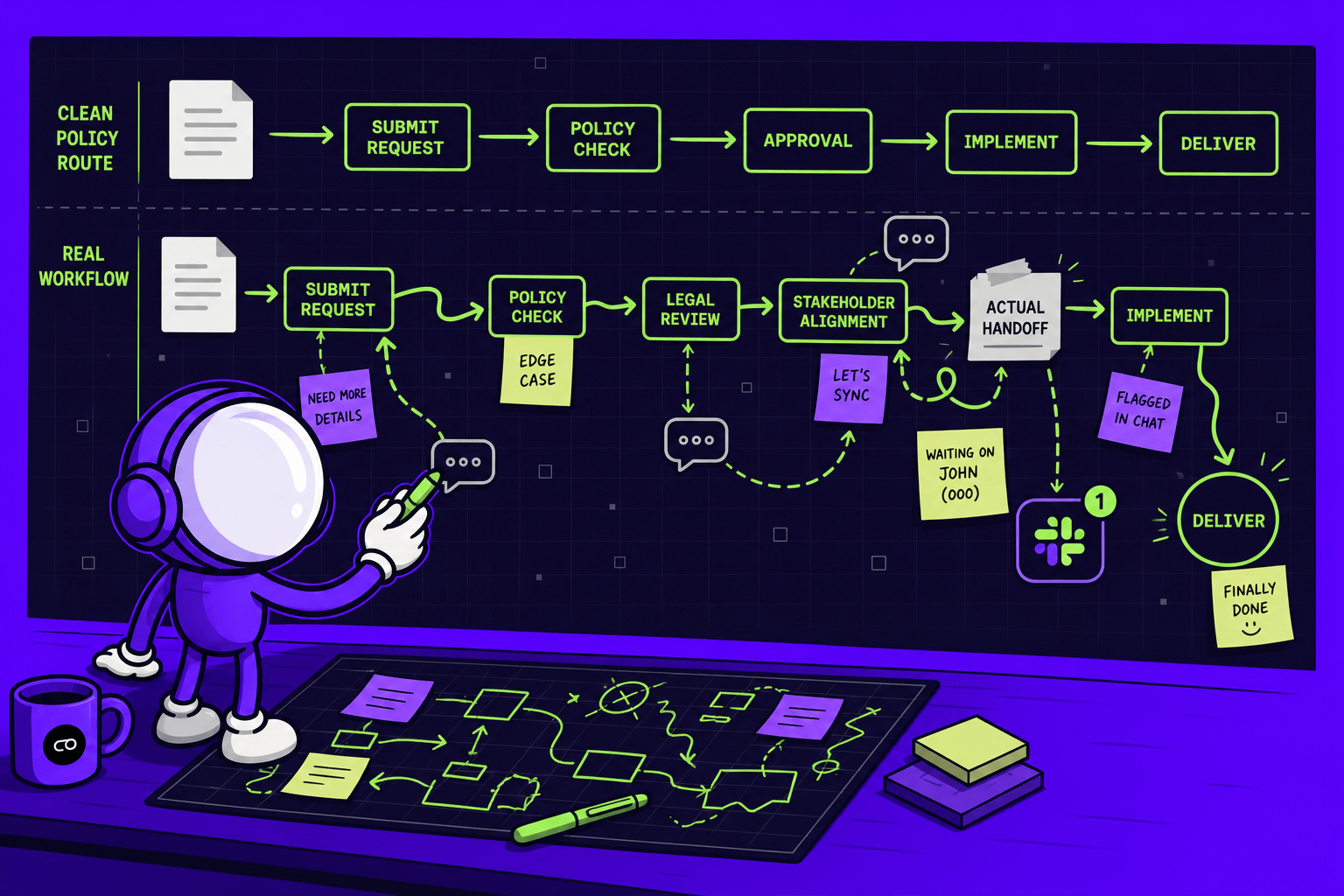
Sit next to the person doing the job and watch a real case - whatever is in the queue right now, not one they remember and not one they picked as a good example. People describe the clean version. They are not hiding anything; the shortcuts have simply become invisible to them. Nobody thinks to mention the tab they open out of habit.
Five questions get you most of the way:
- What told you to start?
- Which tool did you open first?
- What did you check before you acted?
- What did you ignore on purpose, even though the system showed it?
- What made you stop and ask someone else?
The last question is the important one. Every time someone stops to ask a colleague, you have found a rule that exists only in a person's head. Those are the places where the process depends on memory, and the reason software cannot take it over yet.
Write the process steps down as they happen. One action per line. Whenever the work can go two ways, write down what decides it and what happens on each side. Keep going until the job is finished.
If you want a standard way to draw the map, BPMN 2.0 (opens in new tab) - maintained by the Object Management Group and made a formal specification in 2010 - is the most widely used notation for process diagrams. For a first attempt, a numbered list in a shared document works just as well. Drawing it is not the hard part.
Step 3: Write down the exceptions, not just the normal path
This is where automation projects usually fail.
The version where nothing goes wrong is easy to write, and it is almost never where the time goes. The cost sits in the missing field, the duplicate record, the invoice total that does not match the purchase order, the approval that has been sitting in someone's inbox since Thursday. Write each of these down next to the normal path.
Write down every handoff as well - every point where the work passes from one person or team to another. Handoffs are where work stops moving without anyone noticing.
Watch for one pattern in particular. If the same exception comes up more than once in a month, it is not an exception. It is a normal part of the process that nobody has written down, and it is being treated as bad luck.
Mapping one process that crosses several teams can take weeks. That sounds slow, until you compare it with the alternative: finding the same gaps eighteen months into an automation project you have already paid for.
This step is finished when you can follow one real case from start to end without guessing what happens next or who decides.
Step 4: Turn the map into instructions someone can follow
Your map is now accurate. It is still not usable.
A map shows what the process looks like from above - the order of the steps, the branches, the handoffs. Standard operating procedures do something different. They tell one person what to do next, in what order, and what to check before moving on. Nobody has ever learned a job from a diagram.
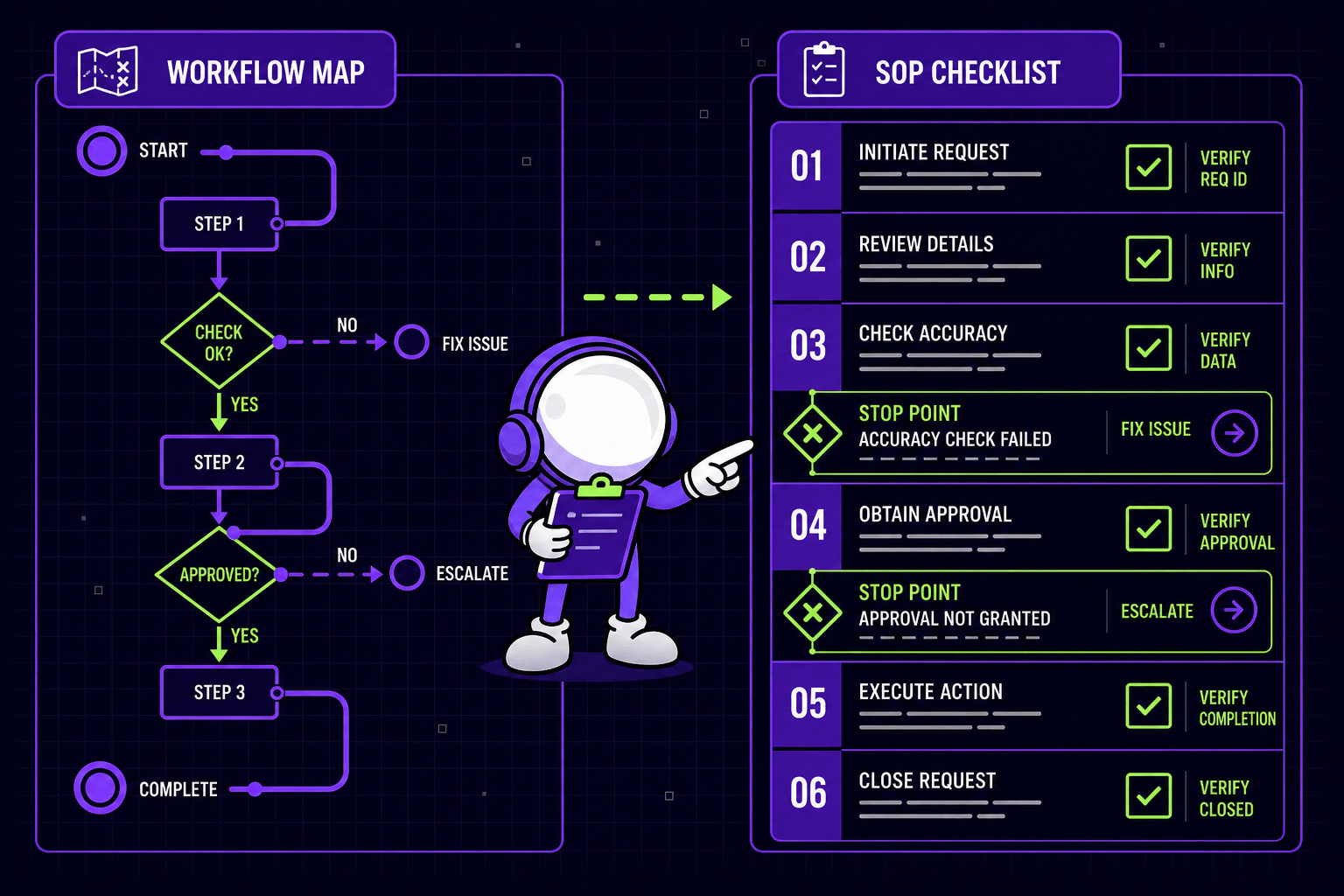
Write the normal case first. One action per line, and start each line with a verb. This matters more than it sounds. A step like "review and approve the request" hides two actions and a decision - split it, write down what the person checks, then write what they do next.
Then write the parts that break automation: the limits, the choices and the judgement calls. Give every limit an exact number. "Escalate to production if the order is over €5,000 or the delivery window is under ten days" is a rule. "Use judgement on rush orders" is not a rule. It is a future argument between two people who both think they are right.
Separate policy from preference. Policy is what must happen. Preference is how your best person likes to do it. Both are worth knowing, but only one of them has to be followed. If they are written the same way, the next person cannot tell them apart.
This is also the point where documentation stops being a good habit and becomes a requirement. ISO 9001 (opens in new tab), the quality management standard, counts documented information among its requirements, so for many manufacturers this work is already obligatory. The 2015 edition is still the one in force, but voting on its replacement closed in July 2026 and the new edition is now at the publication stage (opens in new tab), due in September 2026 with a transition period to follow. That makes this a good year to have your processes written down rather than remembered.
Finish it so people will actually open it. Link straight to the exact form, queue or report instead of describing where it lives. Add screenshots only where the screen is genuinely confusing. Name an owner and a backup for each section, add an escalation contact, and write down the date of the last review.
The test for this step is simple: give it to someone who has never run the process and watch them handle a real case. A few clarifying questions is a pass. Twenty-seven is a rewrite.
Step 5: Check automation readiness before you automate anything
Now test the document against real work. Take three to five recent cases - normal ones, messy ones, and at least one that annoyed somebody last week - and run each of them through what you have written.
Mark every place where people skip a step, where data arrives late or blank or wrong, where someone stops to make a judgement, where two employees solve the same problem in different ways, and where a handoff causes a delay or nobody is sure who has the work.
Then apply the simple test:
If the person who normally runs this step is away for a week, does it still run cleanly?
If not, you have not documented a process. You have documented a person.
Fix the document while the test is fresh. You should end up with a corrected workflow file, a short list of the problems that keep coming back, a clear split between what software can take over and what still needs a person, a named owner, and a review date in the calendar.
If the steps still change depending on who runs them, what mood they are in, or who happens to be in the room - stop. Clean it up first. This is not bureaucracy. This is the work, and it is where real process improvement starts.
What you get from business process documentation
The payoff is not a tidy folder.
Both examples below are our own projects, and both began with exactly this work.
A Lithuanian bicycle manufacturer (opens in new tab) making thousands of high-precision bikes a month was running quality control on paper forms, Excel sheets and informal messages. Defects were found late, they were hard to trace back, and information got lost between teams. The documented process was then built into a system: goods receipt checks with photos, barcode-scanned inspections on the line, random batch inspections, and repair times recorded automatically. The result was 100% traceability with digital audit trails, 80% less manual documentation and 65% fewer quality deviations.
Note the second number. Writing the process down properly is what made it possible to stop writing it down by hand.
The same thing happened at a steel structure manufacturer (opens in new tab) that tracked production in Excel: slow, full of errors, and with no live view of what material was on the factory floor. Once material requests, supplier bidding and warehouse records lived in one system, output rose 15%, material picking and dispatch became 35% faster, and every production manager got three hours of their day back.
Neither company got there by writing a better manual. They got there by writing one good enough to know exactly what to build.
Why documentation goes out of date - and what to do about it
Documentation is a photograph of a process that keeps moving. Within a few months it is out of date, and nobody has noticed. Naming an owner and setting a review date slows that down. It does not stop it.
The only real fix is for the documentation to stop being a document. When the rules live in the software, the process cannot drift away from its description, because the description is what runs. That is where this work is meant to end up, and why the mapping is worth doing carefully rather than quickly.
This is the idea behind the tools we run ourselves. Our Invoice Collection Agent (opens in new tab) collects invoices from inboxes and other approved sources, removes duplicates and files them by month. Anything it cannot sort out goes to a named person instead of being guessed at. The routine work runs on its own. The decisions do not. That is the same split you produced in step five.
The bigger version is our AI Business Brain (opens in new tab), built on an idea that should sound familiar by now: a person can leave, but business memory should remain.
We went through this ourselves. Payroll exports, invoicing spreadsheets and time-tracking logs sat in six different tools, quarterly reports took six hours to put together, and every business question started a round of Slack messages and Excel merges. Connecting the sources, instead of writing better instructions for merging them, got us insights three times faster, 30% lower overtime costs and 25% less scope creep (opens in new tab).
One last warning. Until the rules live in a system, they live in chat. We wrote about what happens when chat becomes your system of record (opens in new tab), and about the cost of a process that lives inside one person (opens in new tab).
Frequently asked questions
What is business process documentation?
It is a written record of how a process really runs: what starts it, each step in order, where decisions are made and on what limits, what happens when something goes wrong, where the work passes between people, and who is responsible for the result. The test is whether someone who has never done the job can follow it and get it right.
How long does it take to document a business process?
For one process with a clear start and end, expect days rather than hours. A process that crosses several teams and systems can take weeks. Most of that time goes into watching real cases and writing down exceptions, not into writing.
What should business process documentation include?
The trigger, the end point, a named owner and a backup, the systems and files used, the normal path with one action per line, every decision with its exact limit, the exception paths, the handoffs between teams, who to escalate to, and the date of the last review.
How do you know a process is ready to automate?
Run three to five recent cases through the document, including at least one messy one. If the steps change depending on who runs them, if data arrives blank or late, or if the process stops working when one person is away for a week, it is not ready. Fix it first, then automate the part that is stable.
What is the difference between process mapping and process documentation?
Process mapping shows the shape of the work: the order of the steps, the branches, the handoffs. Documentation gives the instructions a person can follow. You need the map first, but nobody can run the process from the map alone.
Where to start this week
Assign an owner today. Set the review date today. Test one live process before Friday. That is enough to tell you whether it is ready for software, or whether the inputs, exceptions and decision points still need work.
If you would rather get an outside opinion first, our free AI process diagnostic (opens in new tab) takes about three minutes and shows where most of your manual work sits. It covers the six places we see it build up most often: invoices typed in by hand, reports put together from several Excel files every month, inquiries piling up in a shared inbox, orders re-typed from one system into another, proposals that take longer than the client will wait, and prices and lead times living in one person's Excel.
A Quick Look takes five business days: one engineer, one process, a clear yes or no and the scope of a first step. A Full Audit takes two to three weeks, covers the whole process, and ends in a priority list of what to do first, what later, and what not at all. A Deep Dive takes five to six weeks and goes into the process and its data, for critical processes where mistakes are genuinely costly.
What you pay for the audit comes off the price of the implementation, because we build what we recommend (opens in new tab).
And sometimes the honest answer is that you do not need AI at all. You needed the map.